Appointment Scheduling Chatbot: How It Books and Hands Off

Key takeaways
- An appointment scheduling chatbot answers booking questions, then either books the slot in your calendar or hands the request to your team.
- With a Cal.com action, Agentency writes the booking itself, and the visitor taps Confirm before anything is created.
- Questions it can't answer go to your team by email, with a link to the full transcript.
- A salon setup uses 3 actions and about 350 replies a month at 20 chats a week, which fits the Starter plan.
Build your booking chatbot → · Free forever plan to try it on your site. Booking and handoff actions start on Starter.
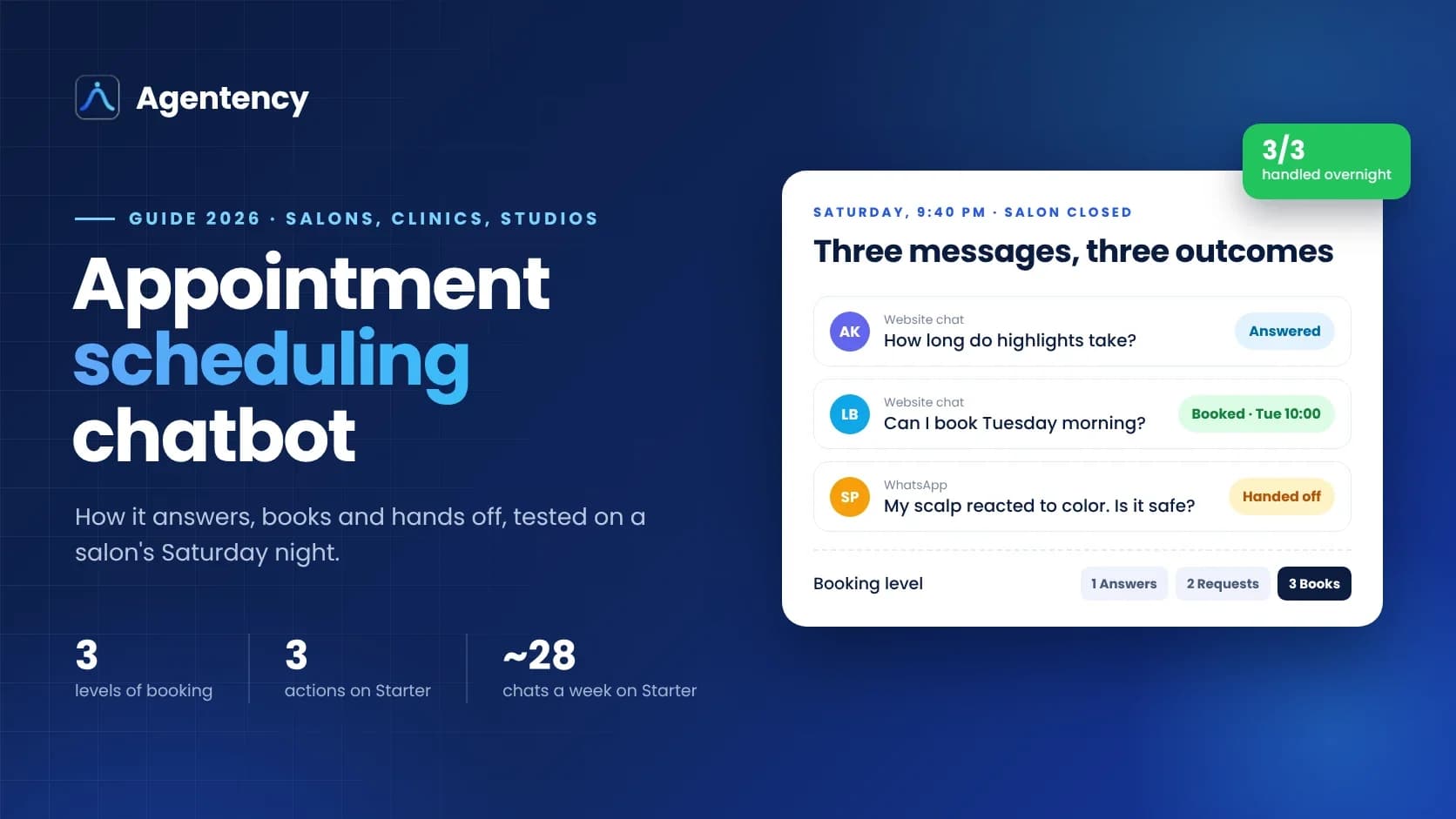
It's Saturday, 9:40 pm.
The salon closed three hours ago.
Three messages are sitting in the inbox. "Do you have anything Tuesday?" "How long do highlights take?" "Can I move my 11:00?"
By Monday morning, two of those people have booked somewhere else.
That's the gap an appointment scheduling chatbot is built to close. Not the calendar. The conversation that happens before the calendar.
What Is an Appointment Scheduling Chatbot?
An appointment scheduling chatbot is an AI assistant on your website or messaging apps that answers booking questions from your own information, then either books the slot in your calendar or collects the request and passes it to your team. It works after hours, in the customer's words, without a form.
You'll also hear it called a booking chatbot, an appointment chatbot or a chatbot for appointment booking. Same idea.
Here's what it is not:
- Not a calendar app. Your calendar still holds the slots. The chatbot talks to the customer and, when connected, writes into that calendar.
- Not a booking link. A link shows open times. It can't tell someone whether highlights need a patch test first.
- Not a phone receptionist. It works in chat: your website, WhatsApp, SMS and other messaging channels.
Who needs one? Any business where the same five questions come before every booking.
Can a Chatbot Actually Book Appointments?
Yes, but only if it's connected to a calendar. Without that, it can answer and take requests, and a person still confirms.
That difference matters more than any feature list, so here it is plainly:
| Level | What it does | What it needs | Risk | Fits |
|---|---|---|---|---|
| 1. Answers | Hours, prices, service length, policies | Your booking info in its knowledge base | Stale hours or prices | Everyone |
| 2. Takes a request | Collects service, time and contact, alerts the team | Collect info and a handoff email | Slow team reply | Clinics, custom work |
| 3. Books | Writes the booking after the visitor confirms | A calendar connection, such as Cal.com | Time zone, taken slot | Salons, gyms, studios |
A chatbot that answers but can't book still saves the conversation. A chatbot that books without your rules creates new problems.
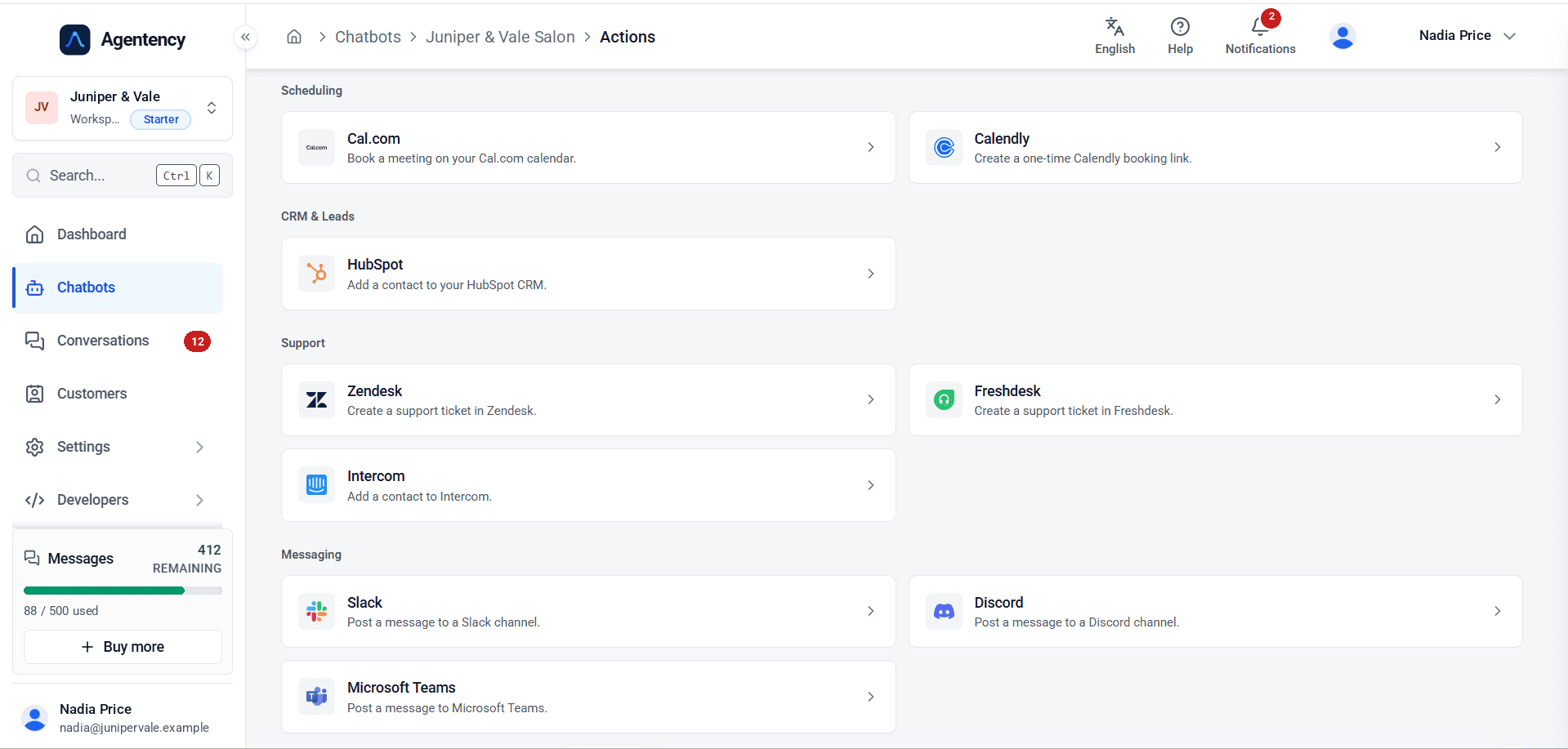 Sample data. Booking templates in the Agentency Actions tab.
One more detail matters. In Agentency, actions that create something, such as a booking, ask the visitor to confirm first. The visitor sees Confirm and Cancel buttons, and the chatbot can't press Confirm for them, so text on a web page can't talk it into booking.
A Salon Booking, Start to Finish
Let's make this concrete with a sample business: Juniper & Vale Salon, three chairs, open Tuesday to Saturday from 9:00 to 19:00.
Example 1: The Saturday highlights booking
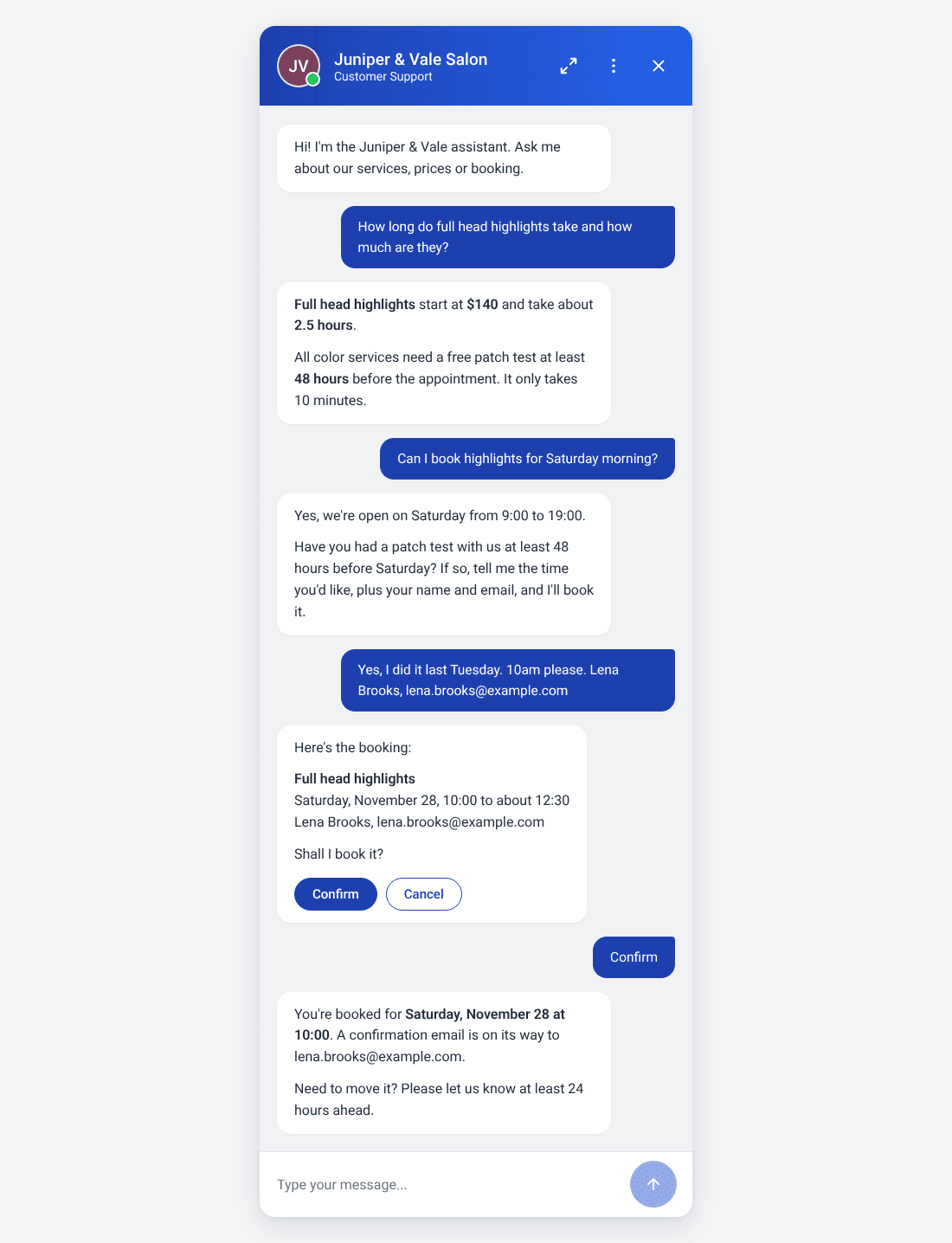
A visitor asks two questions, then books.
 Sample conversation. Fictional business and visitor.
Price, duration, the patch test rule, the details and a summary to confirm. That's four exchanges a receptionist would have handled by hand, and none needed a human.
Example 2: Does it fit the Starter plan?
Agentency plans are priced on messages, meaning the replies the AI sends each month. So the useful question isn't "how many bookings?" It's "how many replies?"
Here are the assumptions, labeled as assumptions: 4 AI replies per conversation, 70% of conversations handled with no staff involvement, and 4 minutes of front desk time for each conversation the chatbot handles.
| 20 chats a week | 30 chats a week | |
|---|---|---|
| Conversations a month | 86.7 | 130 |
| AI replies a month | 347 | 520 |
| Plan that covers it | Starter, 500 replies | Standard, 4,000 replies |
| Plan price (billed yearly, checked Nov 2026) | $15.17 a month | $79.17 a month |
| Conversations handled without staff | 60.7 | 91 |
| Front desk time saved | 4.0 hours a month | 6.1 hours a month |
| Cost per hour saved | about $3.75 | about $13.05 |
So what does that mean? At 4 replies a chat, Starter covers up to about 28 conversations a week. Past that, you're paying for headroom on Standard, and the cost per saved hour goes up until volume catches up.
One honest caveat: on paid plans you can choose a different AI model, and each model shows its own message multiplier. A heavier model uses your allowance faster.
For the wider pricing picture, see what an AI chatbot costs.
Example 3: When it goes wrong
The salon is closed December 25 to 27. Nobody added that to the knowledge base.
Visitor: Can I get a blow-dry on Saturday the 26th?
Chatbot: We're open Saturdays from 9:00 to 19:00. What time would you like?
Accurate to what it was told. Wrong for the real world. The fix: add the closure to the knowledge base and block the dates in your calendar tool. The chatbot only knows what you've written down.
How to Set Up an Appointment Scheduling Chatbot
1- Add your booking knowledge
Paste or upload your services, prices, durations, opening hours, holiday closures and policies.
Why it matters: every answer comes from this material. If it's missing, the chatbot declines instead of guessing.
Tip: write policies as rules. "Cancel at least 24 hours ahead" beats a paragraph.
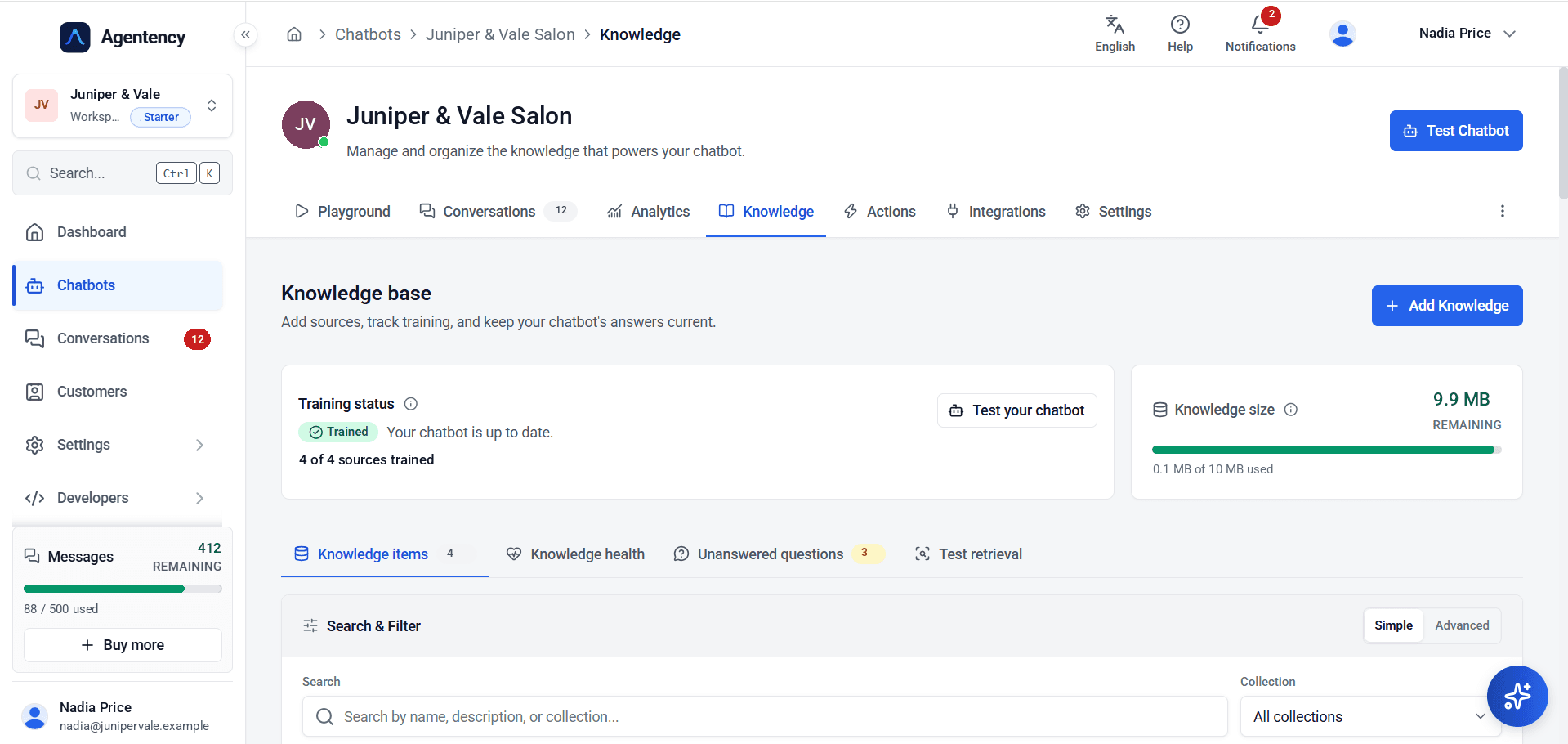 Sample data. Knowledge tab on the Starter plan.
2- Test it with your real questions
Ask the questions your front desk hears every week, word for word.
Why it matters: the unanswered questions list shows exactly which page or rule is missing.
Tip: include one question it should refuse, such as a health question.
3- Add the booking action
Add the Cal.com template from Actions. Tell it when to run in plain language, and leave Requires confirmation switched on.
Why it matters: this is the step that moves you from level 2 to level 3.
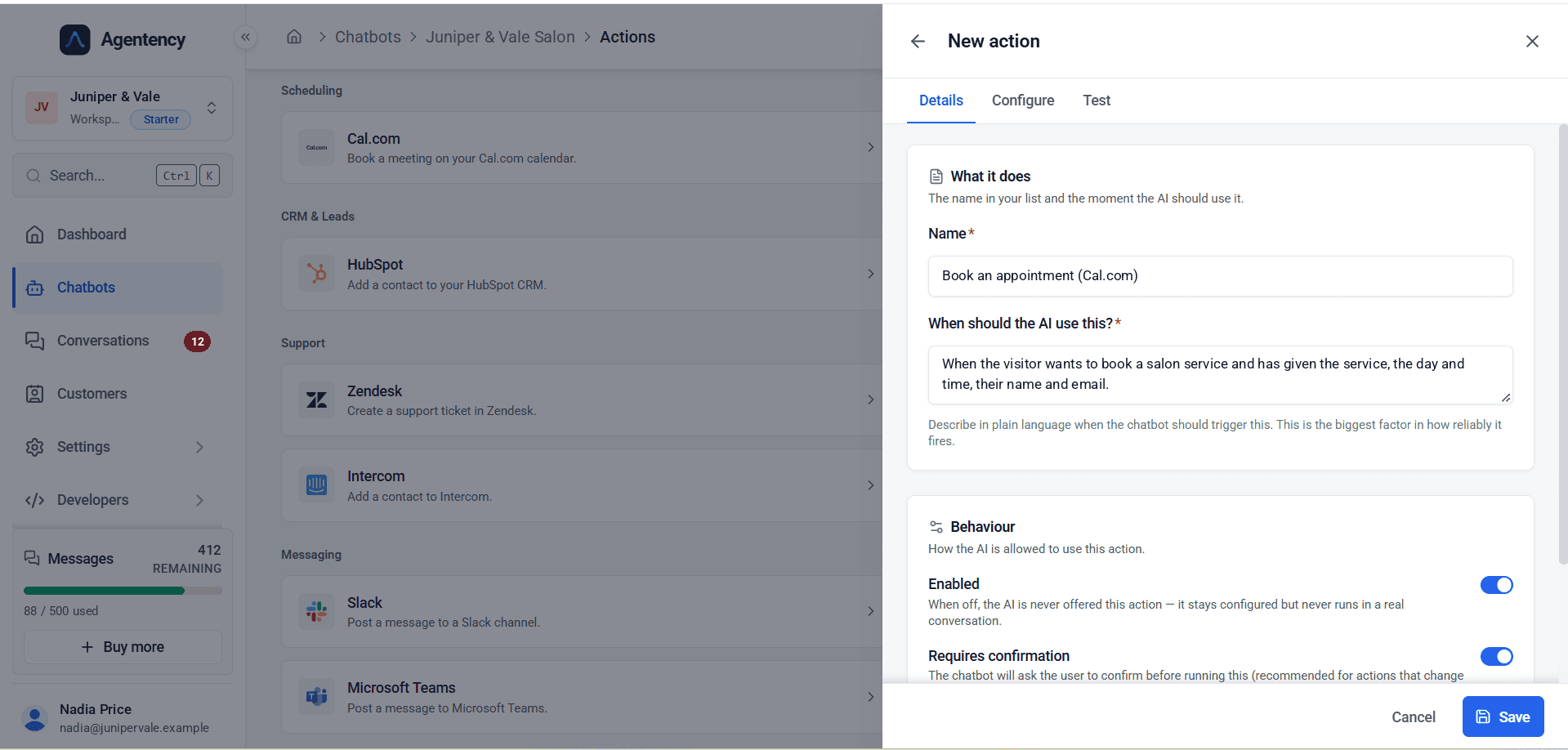 Sample data. The trigger description is the biggest factor in how reliably the action fires.
The action passes the details the chatbot collected straight into Cal.com: the event type, start time, name, email and time zone.
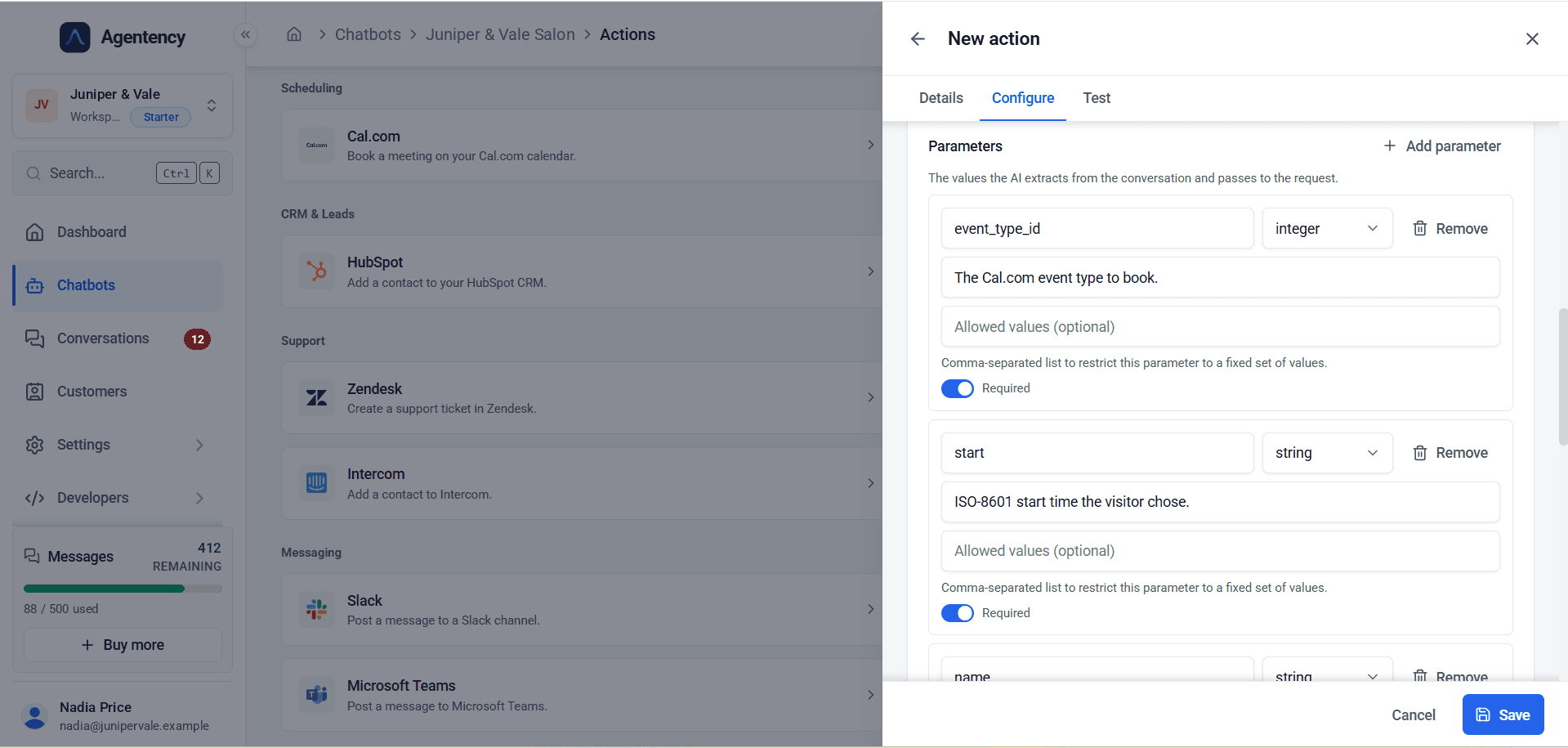 Sample data. The values the AI extracts from the conversation.
Tip: keep your real availability, buffers and closures in Cal.com. To offer only open times, add a step that reads available slots before booking.
4- Add a request route for everything else
Add Collect info for the details you need, and Human handoff for questions a person should answer.
Why it matters: not every visitor books on the spot. Some want a consultation, some have a question only a stylist can answer.
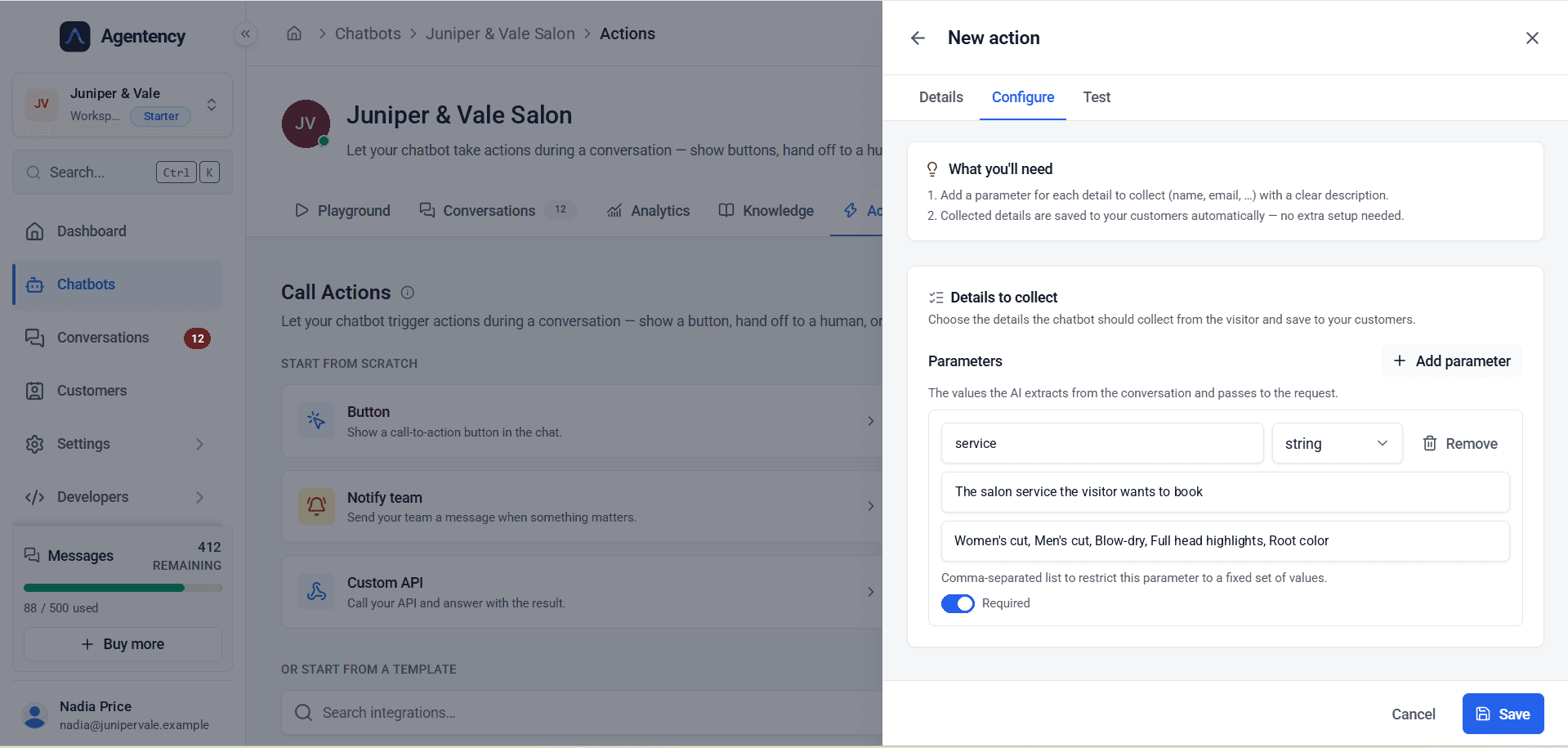 Sample data. Allowed values keep the service name consistent.
Tip: collected details are saved to your Customers list, matched by email for returning visitors.
5- Put it where people message you
Add the widget to your website, then connect messaging channels.
Why it matters: a lot of booking questions arrive on WhatsApp, not your site. If you haven't set that up yet, here's how to set up a WhatsApp AI chatbot.
Your booking knowledge, one Cal.com action and a handoff email take an afternoon to set up. Start free.
What It Must Know Before Offering a Time
Most bad bookings start with a missing fact, not a bad chatbot. Use this as your checklist.
| Business | Must be in the knowledge base | Should go to a person |
|---|---|---|
| Salon or spa | Service lengths, prices, patch test rule, deposit and late policy, stylist days off | Reactions to products, bridal and group bookings, complaints |
| Clinic front desk | Opening hours, what to bring, parking, insurance and self pay pages, how to cancel | Symptoms, test results, anything clinical |
| Gym or studio | Class schedule, capacity, trial rules, cancellation window | Injuries, membership disputes |
| Home services | Service areas, call out fees, visit length, what the customer must prepare | Quotes that need an inspection |
If a person would check a document before answering, that document belongs in the knowledge base.
Reminders, WhatsApp and SMS
Booking is half the job. Showing up is the other half. How much do reminders help? In a 2013 Cochrane review, moderate quality evidence from seven studies with 5,841 participants found that text message reminders improved attendance at healthcare appointments compared with no reminder. That's healthcare, not salons, but people forget either way.
In practice, AI appointment booking ends at the booking. Reminders usually come from your calendar tool once the booking exists. Cal.com Workflows, for example, can email or text the attendee at a set time before the appointment. Check which plan your calendar tool needs for text reminders.
WhatsApp has its own rule. Under Meta's WhatsApp Business Platform rules, a customer service window opens for 24 hours each time the customer messages you. Inside it you can reply freely. Once it closes, you can only send pre-approved template messages.
So a reminder sent two days after the booking chat is a template message, not a chat reply.
For SMS, Agentency connects to a phone number you own in Twilio, and Twilio bills you separately for texts.
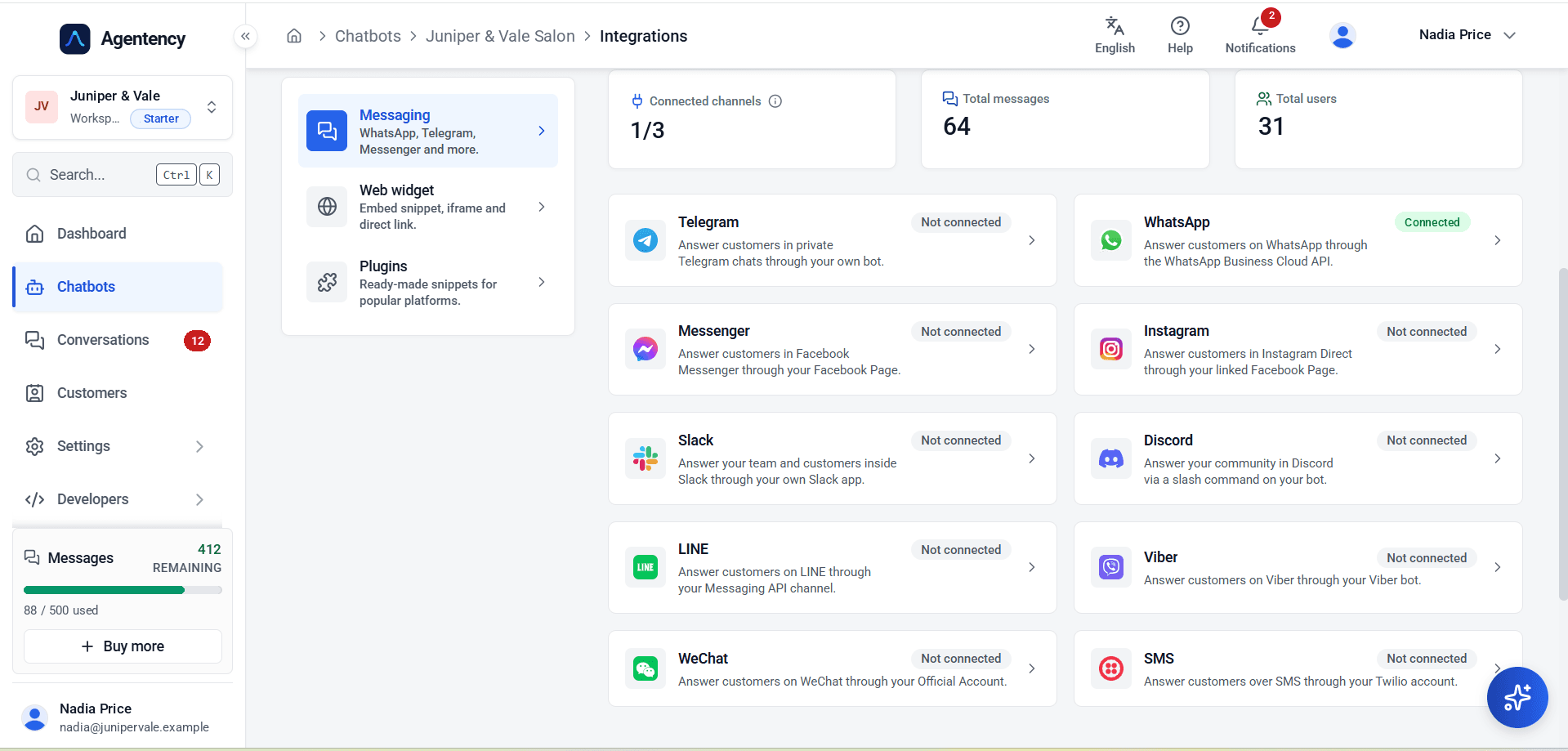 Sample data. One chatbot, several channels.
Chat vs Phone Receptionist vs Booking Link
Search for AI appointment booking and most results are phone agents. Here's how the three tools differ.
| Appointment scheduling chatbot | AI phone receptionist | Booking link | |
|---|---|---|---|
| Where it works | Website and messaging apps | Phone calls | Anywhere you paste the link |
| Answers questions first | Yes, from your content | Yes, by voice | No |
| Books the slot | Yes, when connected to a calendar | Usually, when connected to a calendar | Yes, the visitor picks the time |
| Best for | Customers who text | Customers who call | Customers who already know what they want |
| Typical pricing basis | Messages | Call minutes or calls | Seats or plan |
A booking link works when the customer has no questions. A chatbot works when they do.
Common Mistakes
Letting it answer health or safety questions. Why it matters: a confident wrong answer about a reaction or a symptom is a real risk. The fix: keep that material out of the knowledge base and let the chatbot hand off.
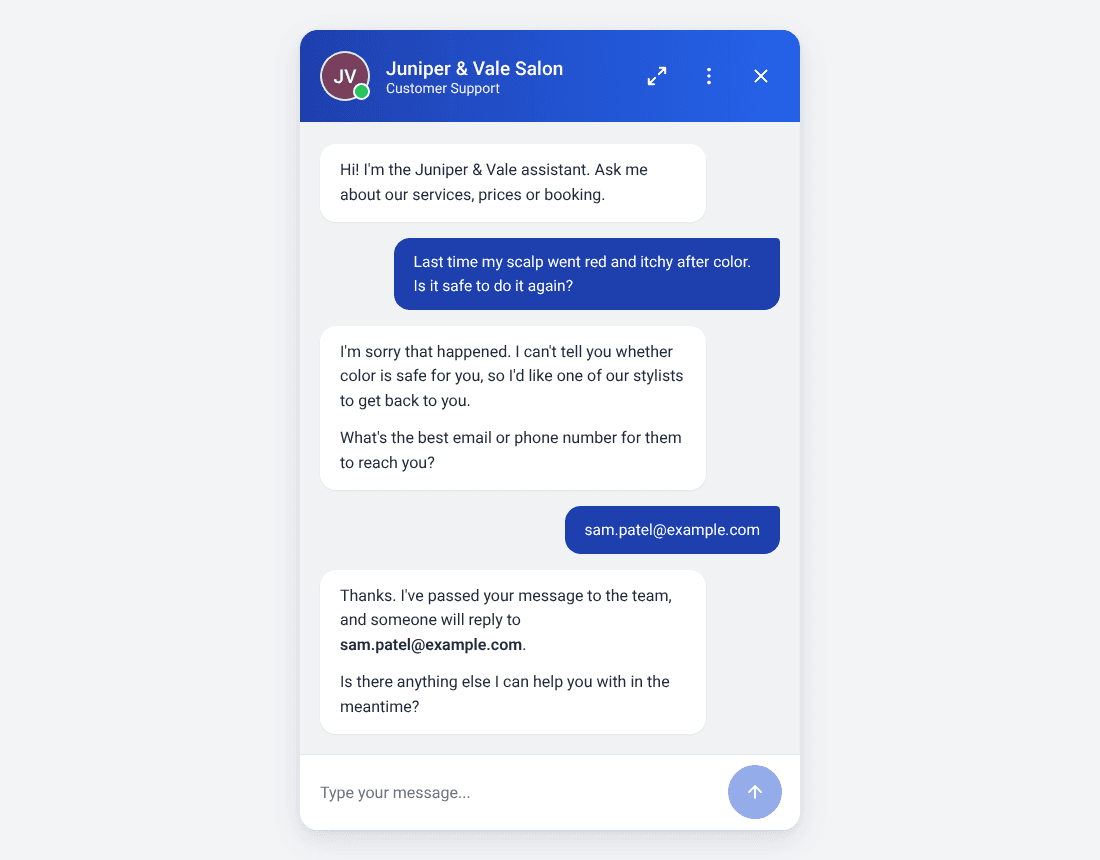 Sample conversation. The agent declines and hands off instead of guessing.
Improvising policy. Why it matters: in Moffatt v. Air Canada, decided by British Columbia's Civil Resolution Tribunal in February 2024, the airline was held responsible for its website chatbot's wrong answer about bereavement fares. The fix: put every policy in writing and let the chatbot quote it.
Ignoring time zones. Why it matters: "10am" means nothing without one. The fix: the Cal.com template already requires the visitor's time zone.
Treating handoff as a live chat. Why it matters: in Agentency, handoff is an email alert with a link to the transcript, not a staffed chat window. The fix: decide who answers those emails, and how fast.
How Agentency Handles Appointment Requests
What if the chatbot could do the front desk's first five minutes, every time, at any hour? Agentency answers from the content you give it, and when the answer isn't there, it says so instead of inventing one.
It books through Cal.com, or sends a Calendly link
The Cal.com template writes the booking into Cal.com after the visitor confirms. The Calendly template creates a single-use link the visitor completes. Both are Call Actions you add from a template.
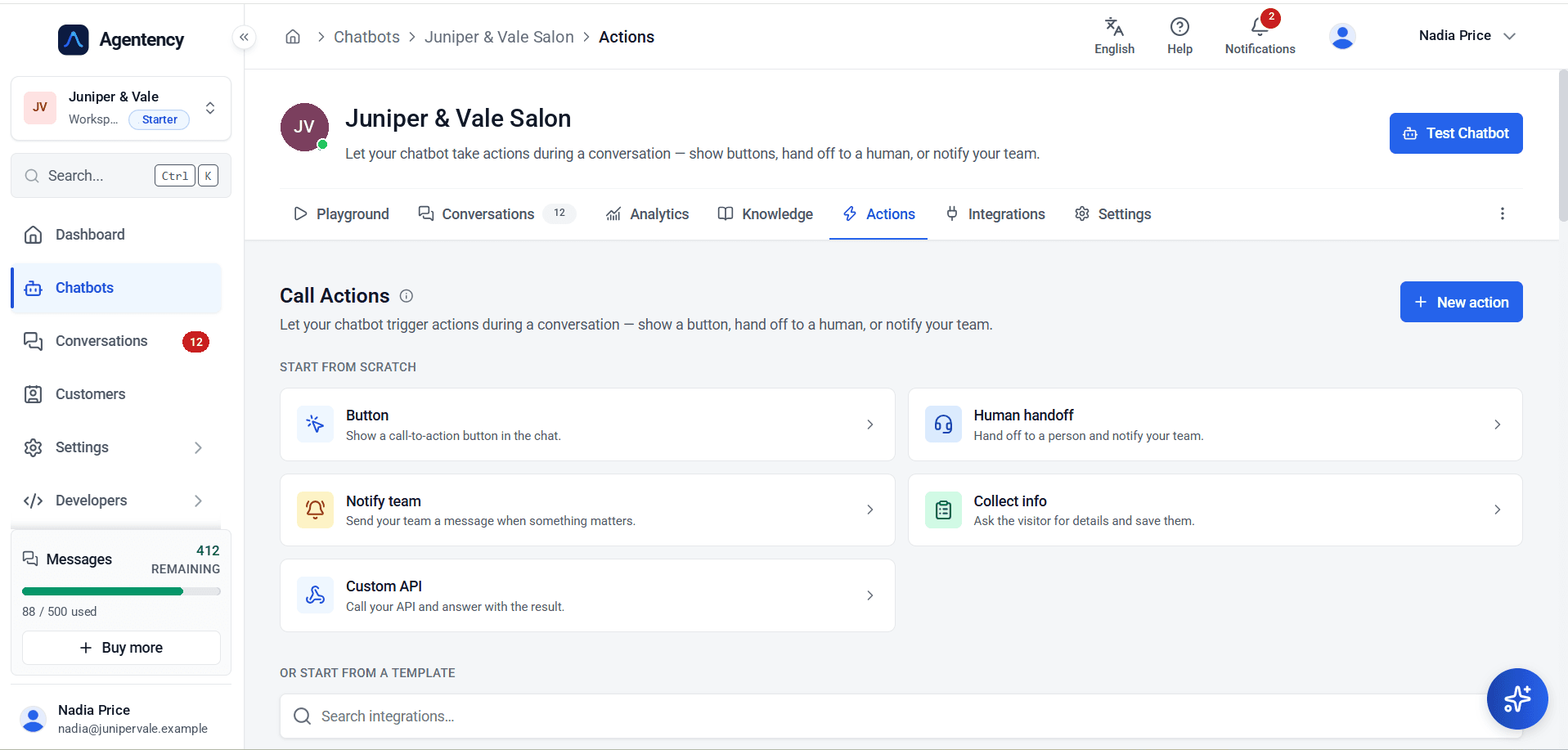 Sample data. Call Actions, the tools the chatbot can use mid-conversation.
It collects details and hands off by email
Collect info saves the visitor's details to your Customers list. Human handoff emails your team with a transcript link and tells the visitor someone will follow up. It's the same approach you'd use to capture and qualify leads, applied to appointments.
It shows you every booking and handoff
Conversations shows which chats were resolved, unanswered or handed off.
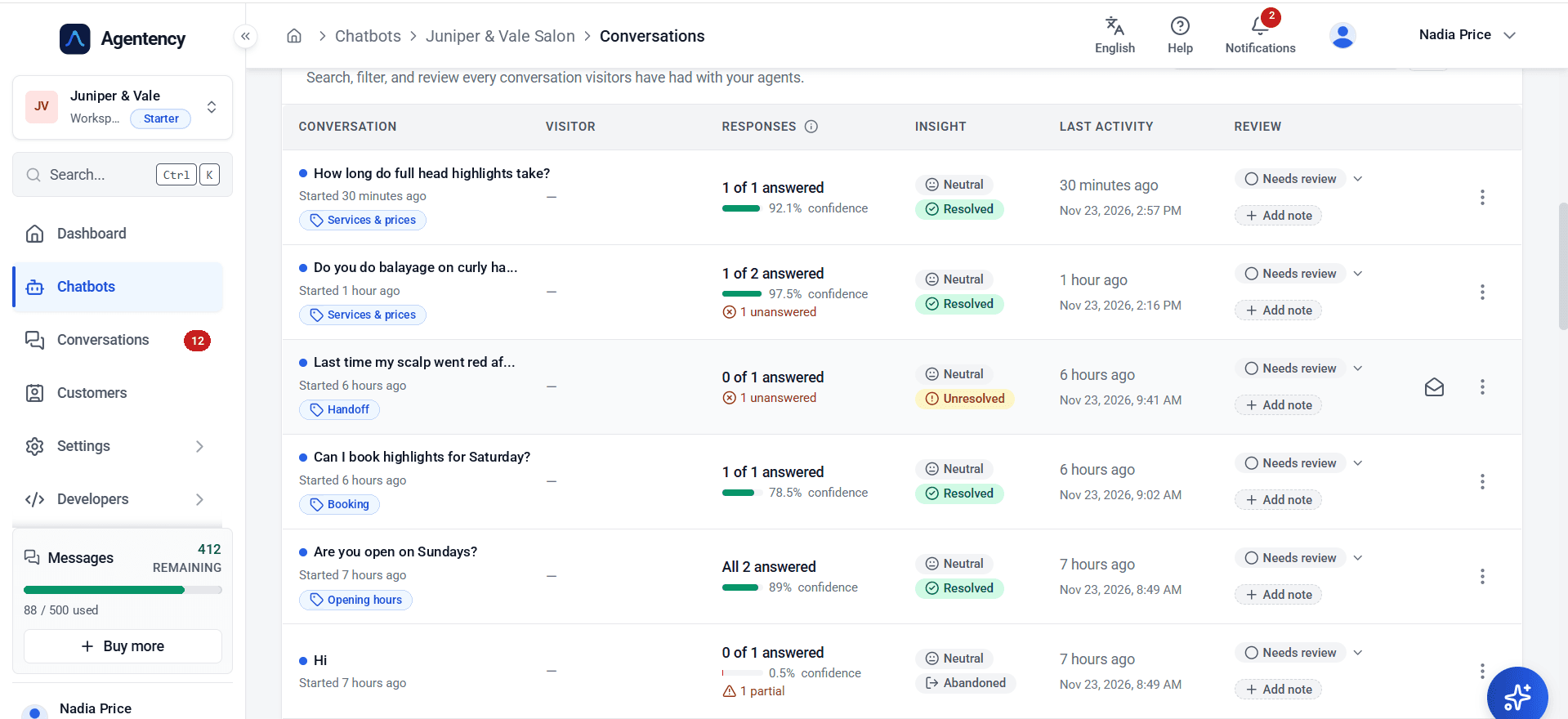 Sample data. Unanswered questions point to missing knowledge.
A note on plans: every action counts toward a per chatbot limit. Free includes 0, Starter 3, Standard 8, Pro 12 and Agency 20. A salon using Cal.com, Collect info and Human handoff fills Starter exactly.
For the industry view, see our appointment booking chatbot for clinics and salons.
Who Needs an Appointment Scheduling Chatbot
Salons and spas
Fixed service lengths, patch tests and evening messages make salons the clearest case for a salon booking chatbot.
Clinic front desks
Practice information only. Anything clinical goes to a person.
Gyms and studios
Class times, trial rules and capacity, plus a booking for the intro session.
Home services
Service area and call out fee first, then a visit window.
If your bigger goal is support beyond bookings, start with what a customer service chatbot does.
Back to Saturday, 9:40 pm
Three messages arrive. This time, one gets the price and the patch test rule. One gets booked for Tuesday at 10:00, confirmed with a tap. One gets passed to the team with the full transcript.
Monday morning starts with a calendar, not an inbox.
Next Saturday night, the questions get answered and the slots get booked. Start free.
Frequently asked questions
Written by