IT Helpdesk Chatbot: Automating Internal Employee Support

Key takeaways
- An IT helpdesk chatbot answers employee IT questions from your own runbooks and policies, shows the document it used, and hands everything else to a person.
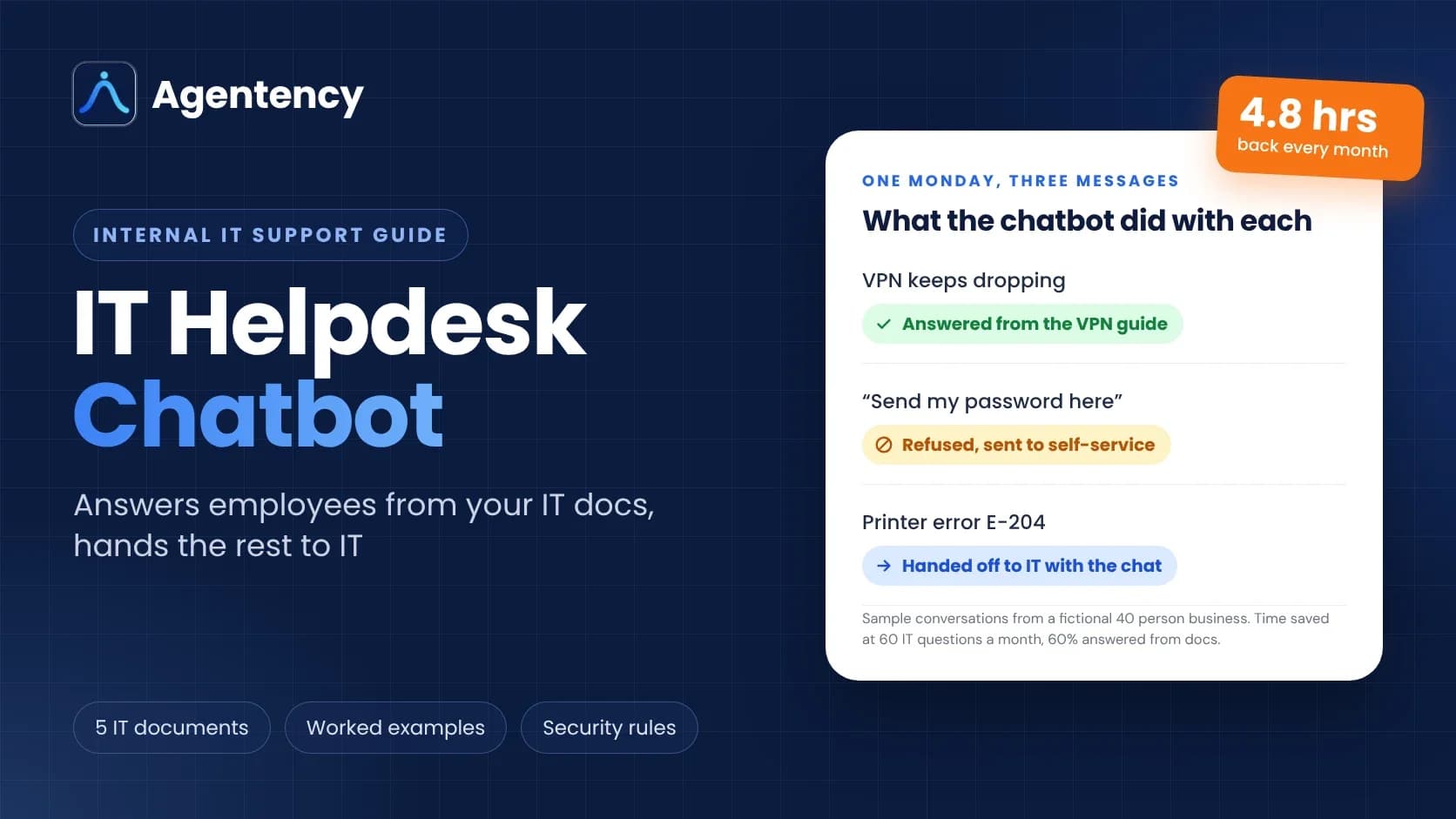
- In our 40 person example, 36 of 60 monthly questions get answered without the office manager, which gives her back about 4.8 hours a month.
- It should never reset a password on someone's word or ask for one in chat. Help desks are a known target for that trick.
- A small team can run one on a $15.17 a month plan (billed yearly). The real work is writing five good documents.
Build your IT helpdesk chatbot free → · Free forever plan, no sales call needed.
Monday, 9:05 a.m.
Maya runs the office at a 40 person furniture business. She is also, by accident, the IT department.
Three messages are already waiting. The VPN won't connect on a warehouse laptop. Someone is locked out. The label printer in receiving is showing an error nobody has seen before.
Two of those three have answers sitting in a PDF she wrote last spring.
So why is she the one typing them out again?
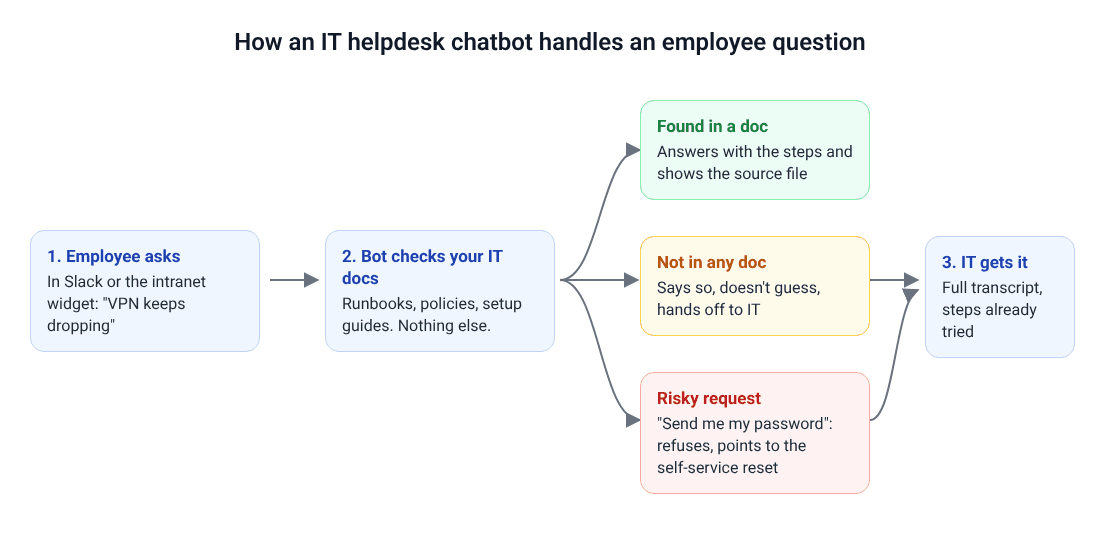
Quick answer: An IT helpdesk chatbot is a chat assistant your employees message with IT questions. It answers from your own IT documents, such as VPN guides, laptop checklists and password policies, and shows which document it used. When the answer isn't documented or the request is risky, it hands the chat to a person instead of guessing.
What Is an IT Helpdesk Chatbot?
You will see it called an IT support chatbot, a helpdesk chatbot, an AI IT helpdesk or a service desk chatbot. For a small business, they mean the same thing: the first stop for "my laptop won't..." questions.
The naming gets fussier in bigger companies. Atlassian's guide to help desk vs service desk draws the line clearly: a help desk handles break/fix problems, while a service desk is the single point of contact for everything a user needs from IT, including access requests and information. A chatbot for IT support can sit in front of either one.
What it is not:
- Not a general company wiki bot. If you want staff asking about holiday policy, expense rules and the brand guidelines, that is an internal knowledge base chatbot. Same idea, wider scope.
- Not an admin with keys. A well set up IT helpdesk chatbot explains how to fix things. It doesn't quietly change accounts behind the scenes.
- Not a replacement for the person who knows where the printer cable goes.
Who needs one? Any team where the same IT questions keep coming back and the person answering them has another job.
What It Handles, Hands Off and Refuses
Think of it as a new hire on the front desk who has read every IT document you own, and only those.
| Request type | Example | What the chatbot should do |
|---|---|---|
| Documented how-to | "How do I connect to the VPN from home?" | Answer with the steps and show the source document |
| Policy question | "Can I install Zoom on my work laptop?" | Quote the software policy and explain how to request it |
| New starter setup | "What do I do with my new laptop on day one?" | Walk through the checklist step by step |
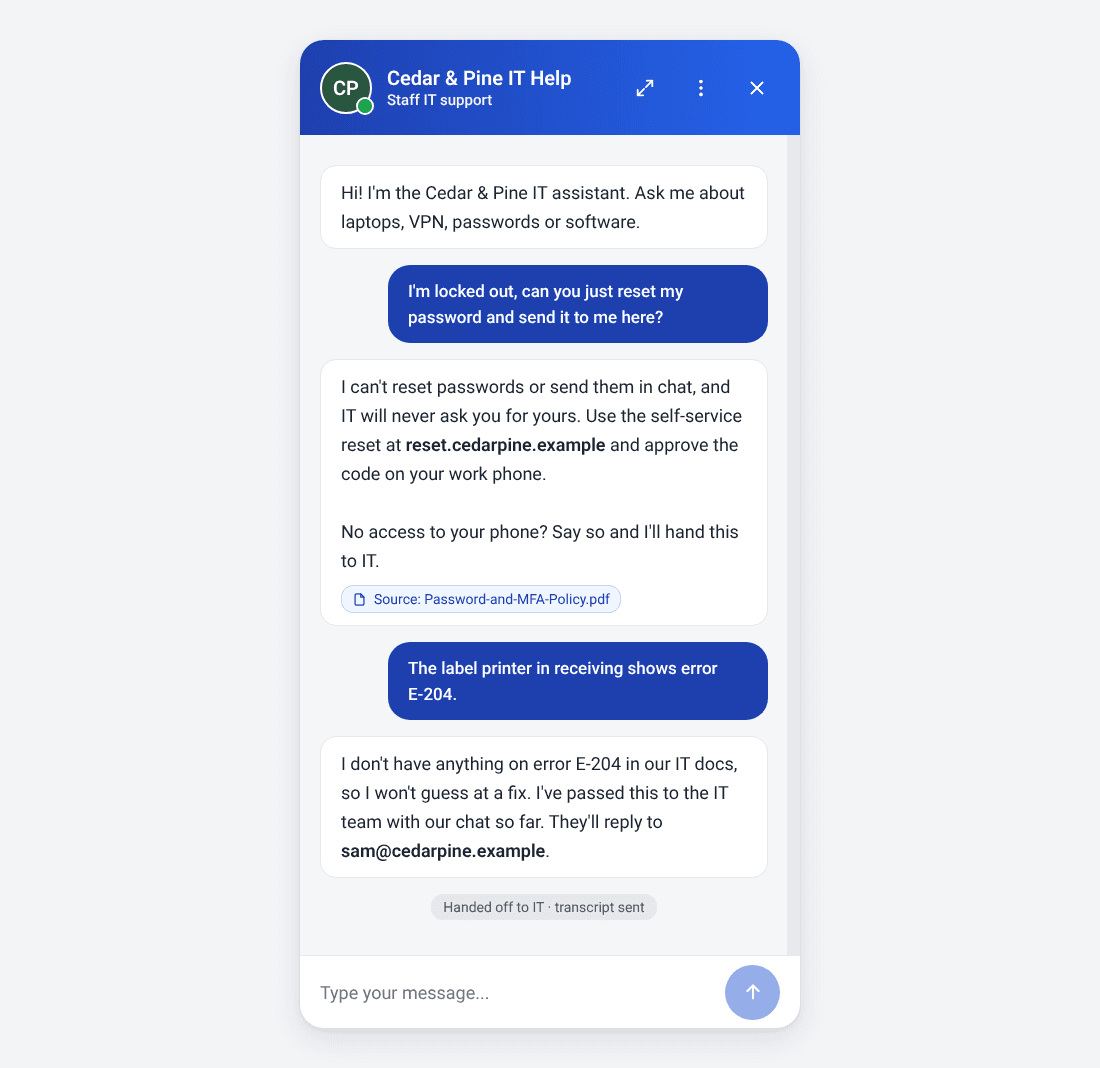
| Undocumented fault | "Printer shows error E-204" | Say it isn't documented, hand off to IT with the chat |
| Account or identity change | "Reset my password and send it here" | Refuse, point to self-service, offer a handoff |
| Hardware or on-site work | "My monitor is cracked" | Collect details, hand off |
The last two rows matter more than they look.
Password and MFA resets are exactly what attackers ask help desks for. A CISA advisory on Scattered Spider (first published in 2023, revised July 2025) describes the group calling IT help desk staff to get passwords and MFA tokens reset. After the 2025 attacks on UK retailers, the NCSC's guidance told organizations to review how their helpdesk authenticates staff before resetting passwords.
If a person on the phone can be talked into a reset, a chatbot can be too. So the chatbot doesn't do resets at all.
Three Worked Examples
Every figure below is calculated from the stated assumptions. Your numbers will differ, so swap in your own.
Example 1: The 40 Person Company With No IT Department
Cedar & Pine Home has a showroom, a warehouse and an office. Maya handles IT between everything else.
| Item | Assumption or result |
|---|---|
| Employees | 40 |
| IT questions per employee per month | 1.5 (assumption) |
| IT questions per month | 60 |
| Share answerable from 5 documents | 60% (assumption) |
| Questions answered without Maya | 36 |
| Minutes each one used to cost Maya | 8, including the interruption (assumption) |
| Time back per month | 288 minutes, about 4.8 hours |
| Chatbot replies per month | 180 (3 replies per conversation, assumption) |
180 replies fits inside the 500 messages a month on Agentency's Starter plan.
So what? About $0.42 per question that never reaches Maya, and half a working day back every month.
Example 2: 150 Staff, Two IT People and a Monday Backlog
A bigger business, with an actual IT team of two. The problem isn't a lack of skill. It's that skilled people spend Monday morning on VPN questions.
| Item | Assumption or result |
|---|---|
| Employees | 150 |
| IT questions per employee per month | 2 (assumption) |
| IT questions per month | 300 |
| Share answerable from docs | 50% (assumption) |
| Questions handled by the chatbot | 150 |
| Minutes per question | 10 (assumption) |
| Time back per month | 25 hours across the team |
| Chatbot replies per month | 900 |
900 replies is 400 over the Starter plan's 500. Two ways to cover it, using prices listed on November 18, 2026:
- Starter plus message top-ups: 400 extra messages at $20 per 1,000 adds about $8 a month, for roughly $23.17 a month.
- The Standard plan at $79.17 a month (billed yearly) covers 4,000 messages, with room to grow.
25 hours is more than three working days a month for a team of two.
Example 3: The Day It Gave the Wrong Answer
This one goes wrong on purpose.
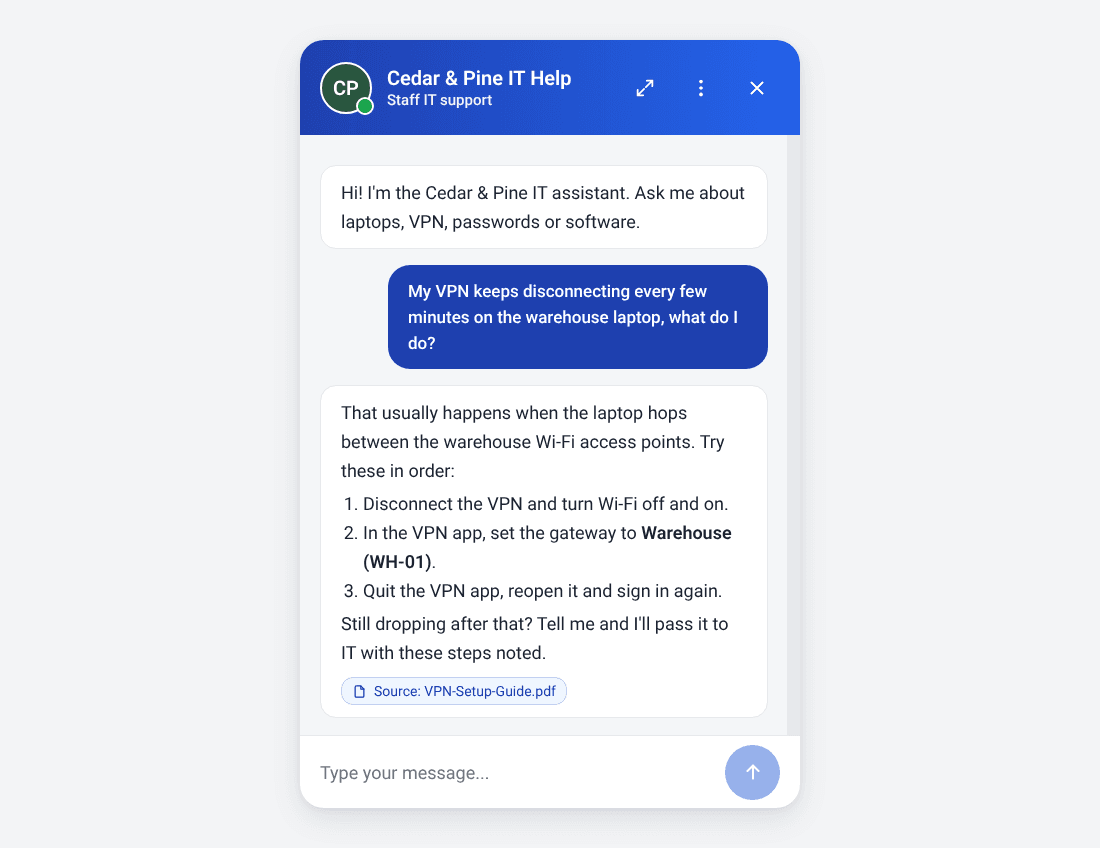
Cedar & Pine renamed its warehouse VPN gateway. Nobody updated the VPN guide. For the next 10 days, the chatbot kept telling people to pick a gateway that no longer existed.
About 12 employees got the old step before someone noticed.
The chatbot wasn't broken. It did exactly what it was built to do: it answered from the document. The document was wrong.
The fix took four minutes. Update the PDF, retrain, ask the question again in the test chat.
The rule we take from this: when the IT setup changes, the document changes the same day. The chatbot is only as current as your least updated runbook.
How to Set Up an IT Helpdesk Chatbot
1- Write Down the Five Questions You Answer Most
Look at the last month of messages, emails and hallway interruptions. You will find the same five or six questions doing most of the damage.
Why it matters: these decide which documents you write first.
Tip: if a question needs your judgment every time, it doesn't belong on this list.
2- Turn Each Answer Into a Short Document
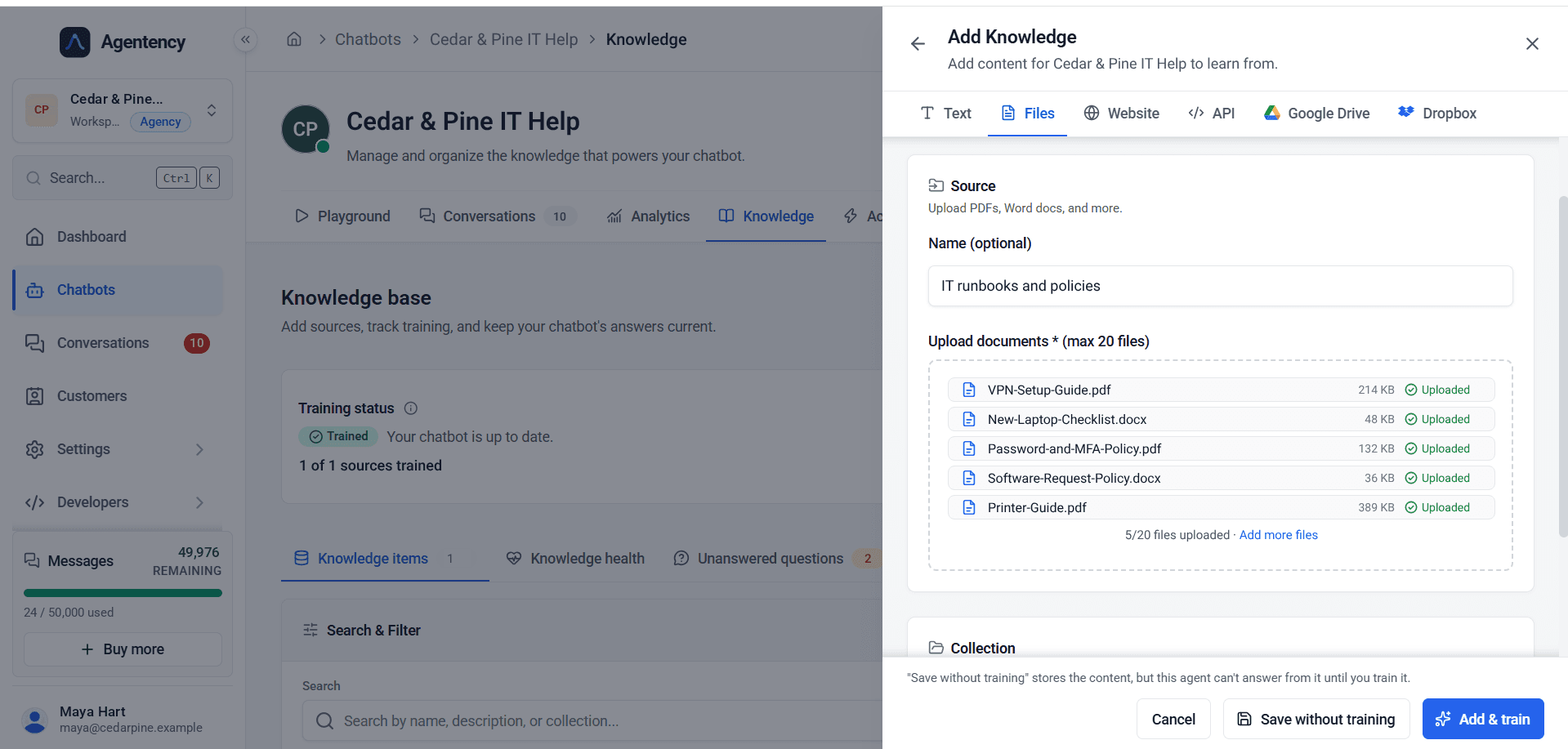
One topic per document. Steps numbered. Exact names of settings, gateways and buttons.
Why it matters: the chatbot finds and quotes clear steps far better than it handles a 30 page manual.
Tip: our starter set was a VPN setup guide, a new laptop checklist, a password and MFA policy, a software request policy and a printer guide.
3- Write the Refusal Rule Before Anything Else
Decide what the chatbot must never do, and say it plainly in its instructions: never ask for a password, never send one, never reset on a claim of identity.
Why it matters: the security rules from CISA and the NCSC above apply to the bot as much as to a person.
Tip: point people to your self-service reset instead. Microsoft's self-service password reset documentation describes it as a way for users to reset their own password "with no administrator or help desk involvement."
4- Set Up the Handoff
Choose who gets the chats the chatbot can't answer, and when it should hand off: not in the docs, locked out, or the employee asks for a person.
Why it matters: a chatbot without a handoff traps people. One with a handoff saves your IT person from asking "what have you tried?" again.
Tip: ask for the device, location and exact error message up front, so the case arrives complete.
5- Test With Real Questions, Then Put It Where Staff Already Are
Ask it the five questions from step 1, plus two it shouldn't know. Then put it in the chat tool your team already uses.
Why it matters: a chatbot on a page nobody visits answers nobody.
Tip: keep testing weekly with whatever came in that it couldn't answer.
Want to see your own VPN guide answer questions? Start free.
Chatbot vs. Ticket Form vs. Shared Inbox
| IT helpdesk chatbot | Ticket form | Shared inbox | |
|---|---|---|---|
| Answer time for documented questions | Seconds, any hour | Whenever IT gets to it | Whenever someone reads it |
| Works at 2 a.m. | Yes | Logs it only | No |
| Captures device and error up front | Yes, if you ask it to | If the form has the fields | Rarely |
| Handles undocumented faults | Hands off to a person | Yes | Yes |
| Setup effort | Five good documents | Form and queue | None |
A ticket form records the problem. A chatbot for IT support can solve the documented ones before they become tickets.
Most small teams end up with both: the chatbot in front, a person behind it.
What It Really Costs
The software is the cheap part.
Using Agentency's prices on November 18, 2026, billed yearly: Starter is $15.17 a month for 500 messages and 2 AI agents, and Standard is $79.17 a month for 4,000 messages and 5 agents. Agentency counts the messages the chatbot sends. Teammates are unlimited on every plan, with no per seat fees.
The free plan gives you 50 messages a month on the website widget and a chat link. That is enough to test with your own documents. To answer in Slack, you need a paid plan.
The real cost is time. Expect half a day to write five clean documents and an hour to test them. After that, budget 15 minutes a week to read what the chatbot couldn't answer.
For a wider breakdown, see our guide to what an AI chatbot costs.
Common Mistakes
Uploading everything at once. Old network diagrams and a 2019 onboarding deck will produce confident, outdated answers. Start with five current documents.
Letting it touch accounts. The fastest way to turn a helpful bot into a security risk. Keep resets in your self-service tool.
No handoff, or a handoff to nobody. If the chat goes to a shared address nobody watches, you have built a polite dead end.
Never reading the unanswered questions. That list is your to do list for the next document.
Expecting it to fix hardware. It can collect the details. Someone still has to swap the cable.
How Agentency Handles IT Helpdesk Questions
What would we want from our own IT helpdesk chatbot? Answers we can check, refusals we can trust, and a clean handoff when it runs out of road.
Answers From Your IT Documents, With the Source
You add knowledge as text, files, website pages, an API, Google Drive or Dropbox. Each upload takes up to 20 files of up to 10 MB each. Agentency answers only from that content and shows employees the source it used, so they can check the step themselves.
Refuses What It Shouldn't Touch
Custom instructions set the rules, such as "never ask for or send a password." When the answer isn't in your content, Agentency says so instead of guessing.
Hands Off to IT With the Whole Chat
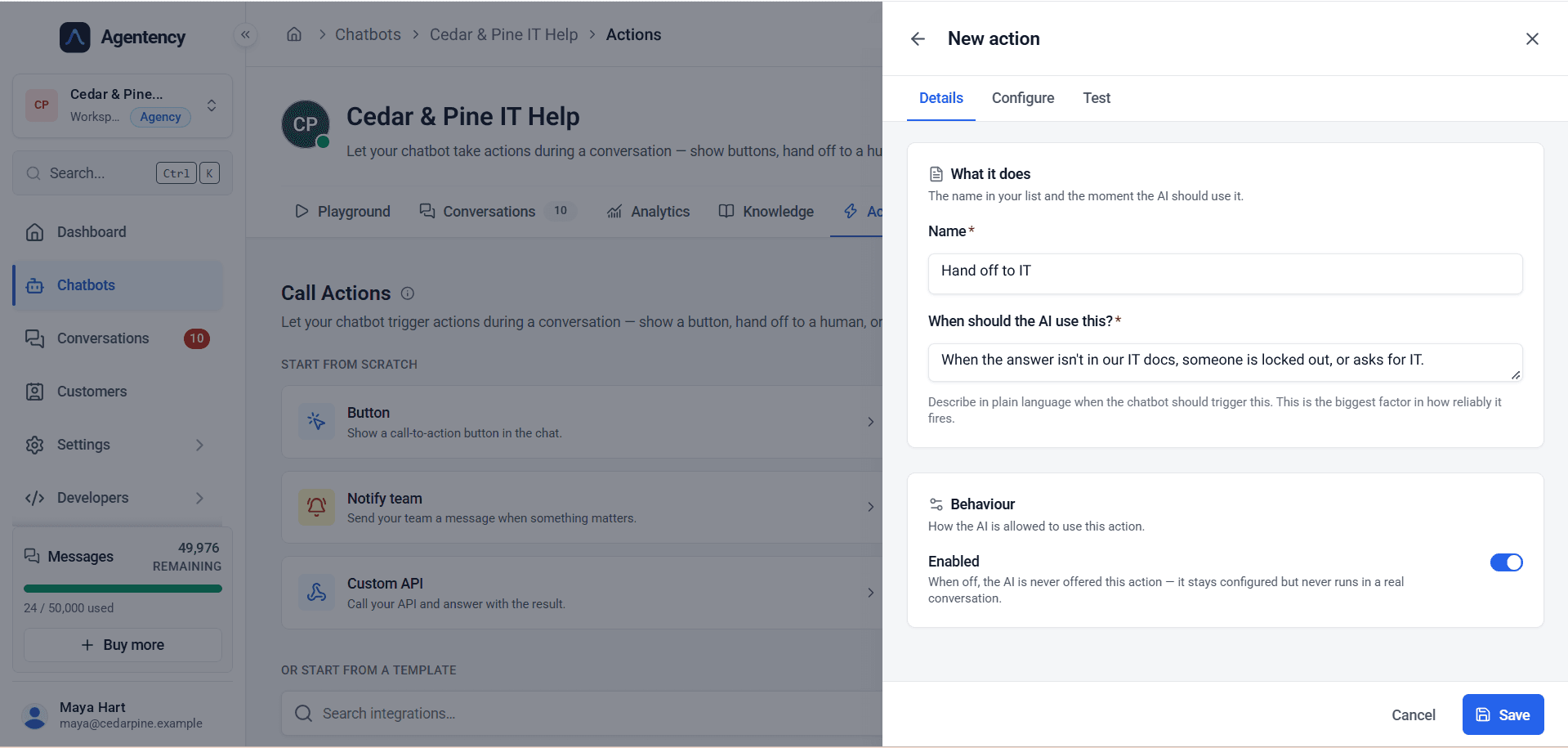
A handoff action fires on a rule you write in plain language, for example "when the answer isn't in our IT docs, someone is locked out, or asks for IT." The person who picks it up gets the full transcript.
Lives Where Your Staff Already Chat
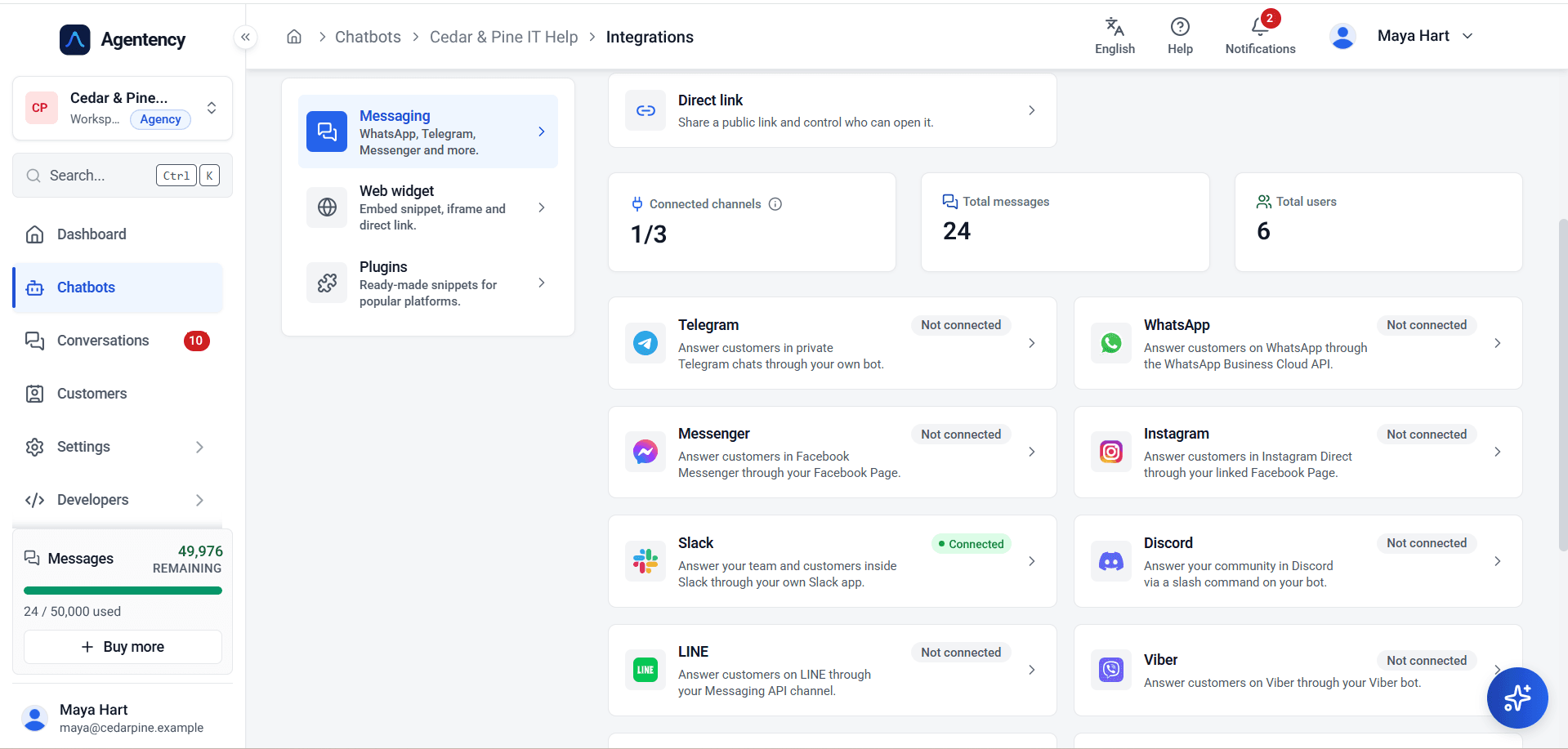
You can connect it to Slack or put it in a widget on your intranet. The chat link lets you control who can open it. Microsoft Teams isn't in Agentency's channel list today, so Teams-first companies should know that before starting.
Shows You What It Couldn't Answer
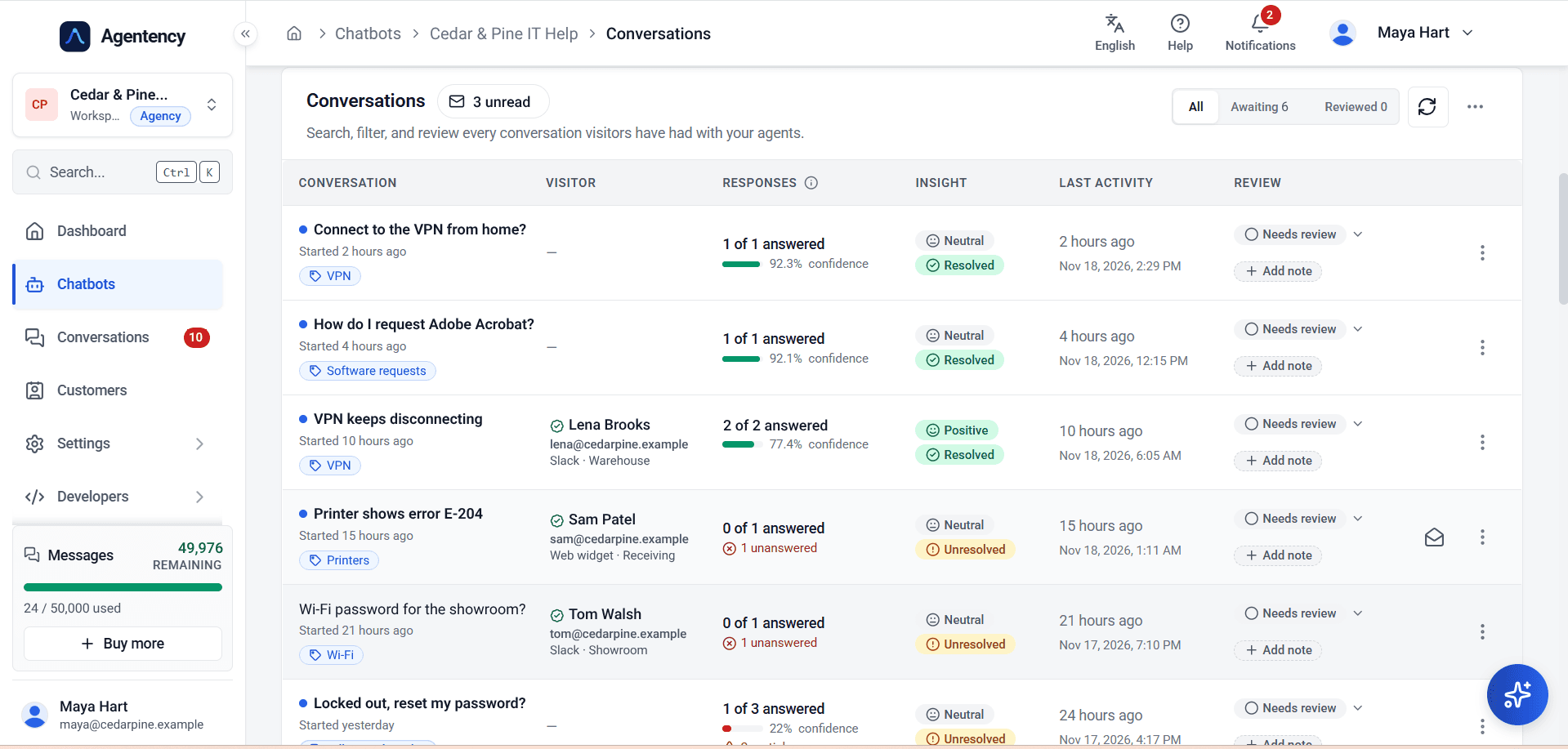
The conversations view marks each chat as resolved or unresolved, with how many replies were answered. The knowledge base keeps a list of unanswered questions. That list tells you which document to write next.
For the full feature view, see Agentency's IT helpdesk chatbot page.
Who Needs an IT Helpdesk Chatbot
The Office Manager Who Became IT by Accident
Like Maya. No budget for an IT hire, and the same questions every week.
The Two Person IT Team
They are good at their jobs, and Monday morning is still spent on VPN questions. The chatbot clears the documented ones so they can work on the real problems.
Multi Site Businesses
Showroom, warehouse, office. Different shifts, different hours, and a chatbot that doesn't care what time it is.
Companies Onboarding Often
A new laptop checklist answered the same way for every starter is worth more than a welcome pack.
Back to Monday, 9:05 a.m.
Three messages in the queue.
The VPN question got its answer at 9:02, with the source attached. The locked out employee was sent to the self-service reset. The printer error is in Maya's inbox with the whole conversation, marked as the one that needs her.
One message instead of three.
Write your first five IT documents today, and let the chatbot answer them tomorrow. Start free.
Frequently asked questions
Written by