Restaurant Chatbot: Reservations, Menus and Orders

Key takeaways
- A restaurant chatbot answers hours, menu, booking and takeaway questions on your site and WhatsApp. When a question needs a person, it passes it to your team.
- Without a booking system connection, it takes table requests and your team confirms them. Promising a confirmed table without that connection is the most common mistake.
- Allergen questions get a strict rule: the bot reads back the listed allergens, and anything about prep, cross-contact or safety goes to a manager.
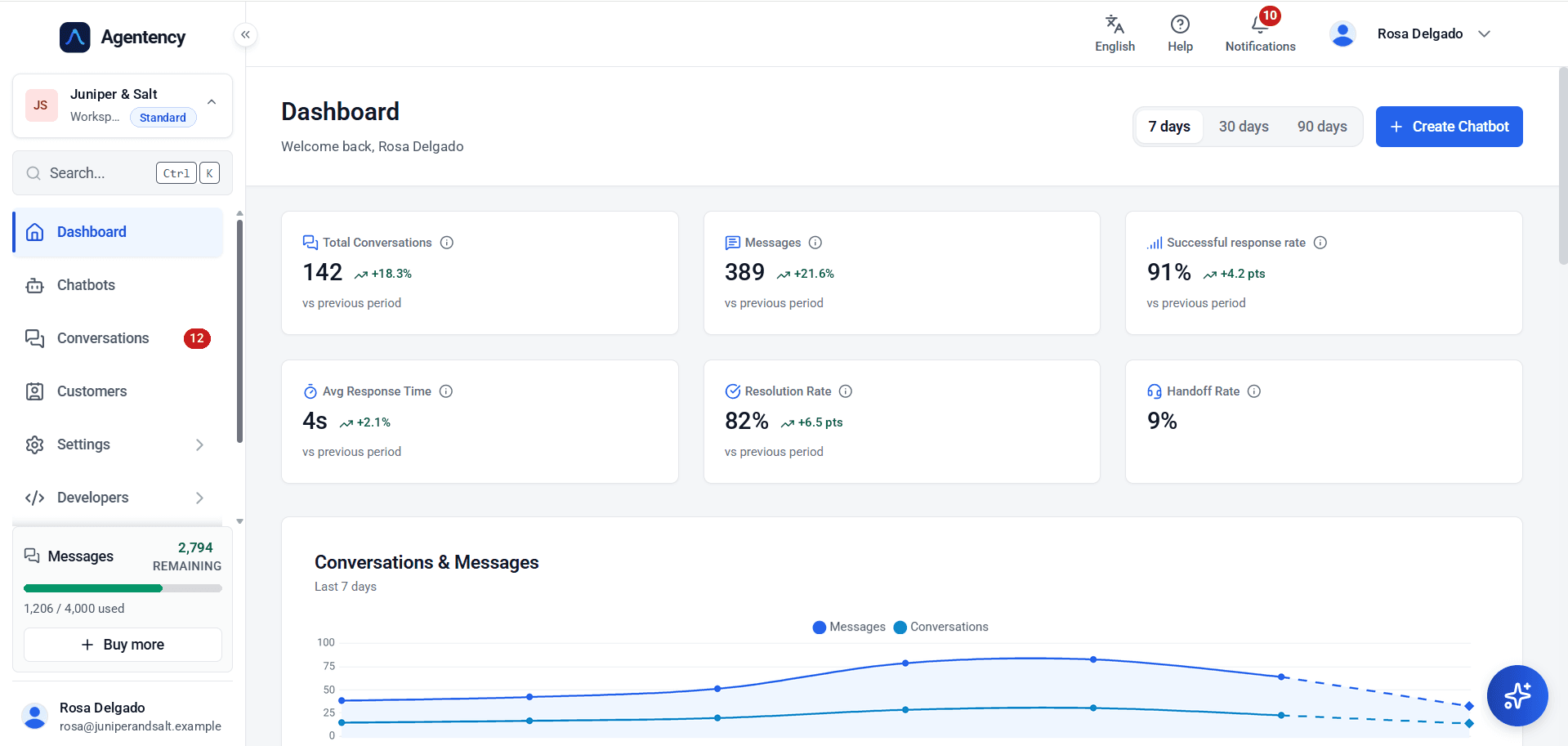
- In our sample week, a 60-seat restaurant handled 142 conversations and 389 messages, which fits a plan with 4,000 messages a month.
Build your restaurant chatbot free → · Free forever plan, no sales call needed.
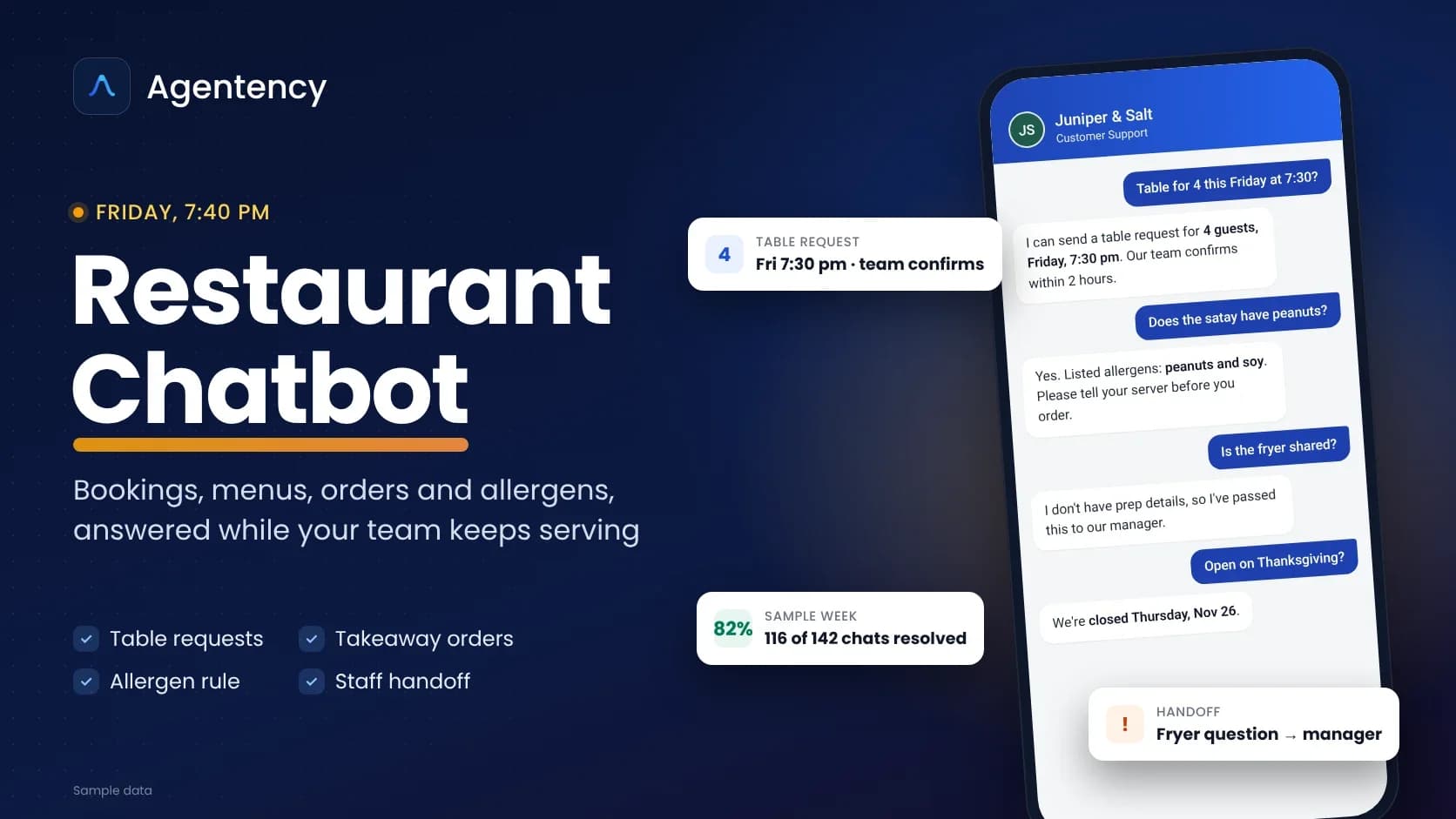
It's Friday, 7:40 pm.
Your host is seating a party of six.
Your phone shows three new messages.
"Table for 4 at 8?"
"Does the satay have peanuts?"
"Are you open on Thanksgiving?"
Nobody has a free hand. By the time someone does, two of those guests have booked somewhere else.
A restaurant chatbot exists for exactly this moment. It's also easy to get wrong, so this guide covers both sides: what it does well, where it has to hand over to a person, and what it costs at a real message volume.
A restaurant chatbot is software that answers guest messages on your website, WhatsApp and social channels, using your own menu, hours and policies. It handles routine questions instantly, takes table requests and takeaway orders, and hands anything risky, like a severe allergy or a complaint, to your team with the full conversation.
What Is a Restaurant Chatbot?
You'll see it called a chatbot for restaurants, an AI chatbot for restaurants or a restaurant AI assistant. They all mean the same thing: an assistant that reads a guest's question in plain language and answers from content you control.
Two things it is not.
It isn't a phone agent. Answering calls is a separate category of voice software. A chat assistant works in text, on your site and in messaging apps.
It isn't the old button menu either. A menu chatbot that makes guests tap "Hours" or "Book" belongs to 2017. A modern one understands "anything vegan for six people on Friday?" in a single message.
Who is it for? Any restaurant where the same ten questions arrive every night, and the people who could answer them are carrying plates.
The industry is already leaning this way. In the National Restaurant Association's 2026 State of the Restaurant Industry report, nearly two-thirds of operators said technology improves the hospitality they deliver, but only 41% of consumers agreed.
So what? Guests notice when a tool makes things worse. A chatbot only earns its place when it's accurate, and when it knows when to step aside.
What a Restaurant Chatbot Can Do: Three Levels
Most confusion about restaurant chatbots comes from one gap: the difference between answering a question and actually changing something in your systems.
| Level | What the guest gets | What it needs | Fits |
|---|---|---|---|
| 1. Answers only | Hours, menu, prices, listed allergens, parking, house rules | Your menu and policies as content | Every restaurant, from day one |
| 2. Collects and hands off | Table requests, takeaway orders and event enquiries, with your team confirming | A way to save details and email your team | Most independent restaurants |
| 3. Books into your system | A confirmed table or a ticket in your ordering system | A connection to your booking or ordering software's API | Restaurants whose software has an API and someone to set it up |
Most small restaurants get the biggest return from level 2, and nothing is wrong with stopping there.
The mistake is running a level 2 bot while promising level 3 results.
Can a Restaurant Chatbot Take Reservations?
Yes, in two ways.
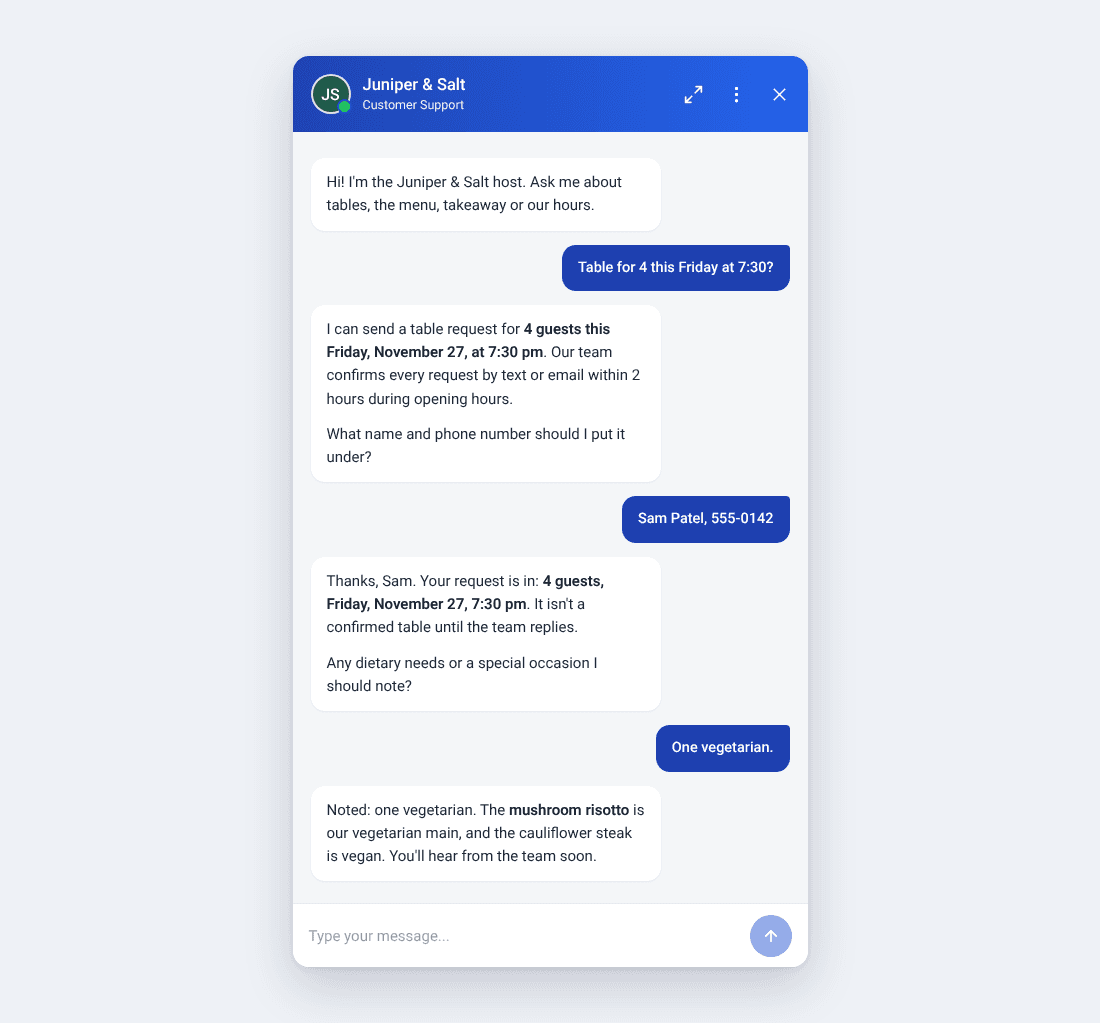
A restaurant reservation chatbot connected to your booking system can check a slot and create the booking. Without that connection, it takes the request: party size, date, time, name and phone. Your team then confirms it.
The honest version tells the guest which of the two just happened.
Sample data.
Notice the line "It isn't a confirmed table until the team replies." That one sentence prevents the worst Friday night there is: a party of four arriving for a table that only ever existed in a chat window.
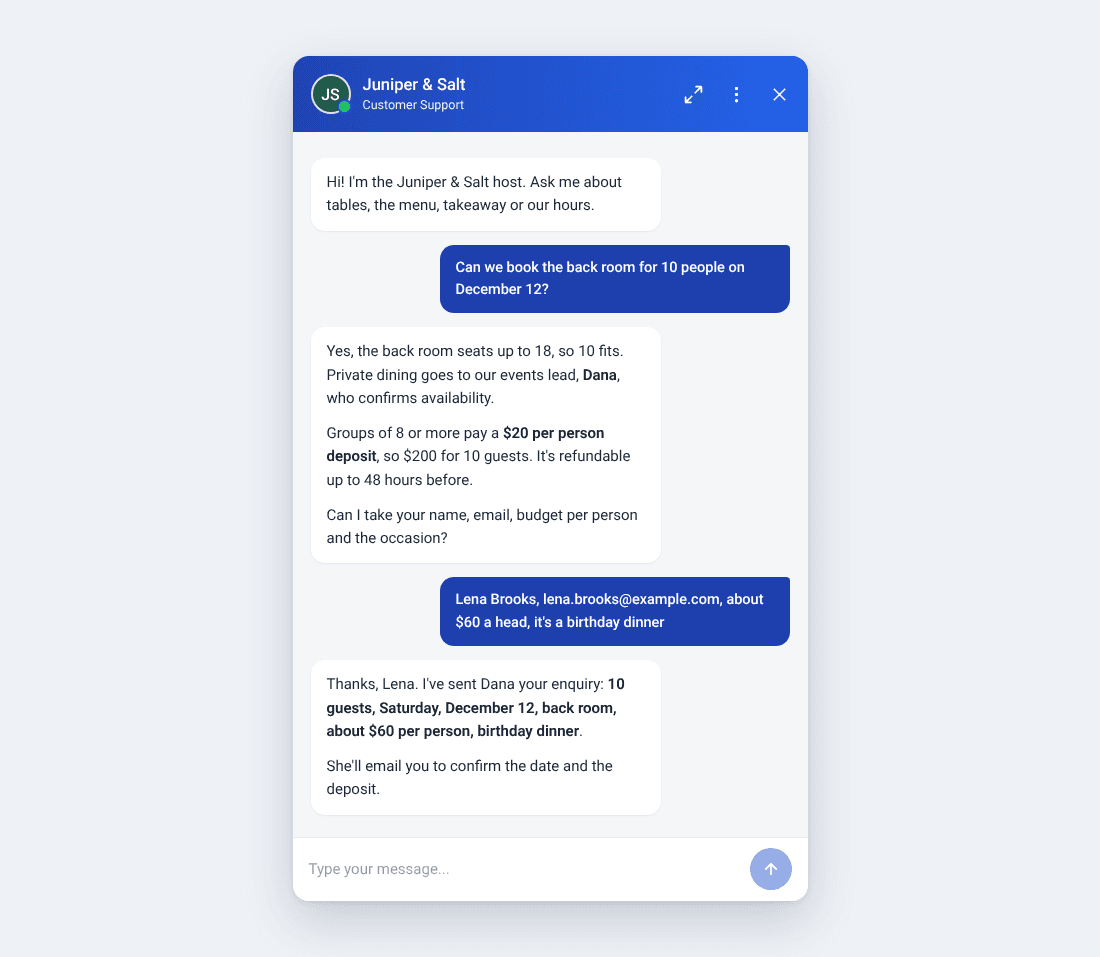
Large groups follow the same pattern, with one difference. They go to whoever runs events, together with the details that person needs.
Sample data.
The bot worked out the deposit: $20 per person for 10 guests is $200. It also collected the budget and the occasion. Dana, the events lead, gets a complete enquiry instead of "someone asked about the back room".
A private dining request is also a lead. It's worth the same care as any sales enquiry, which is why chatbot lead generation habits apply here too.
Can a Chatbot Take Food Orders?
Yes. The real question is where the order goes next.
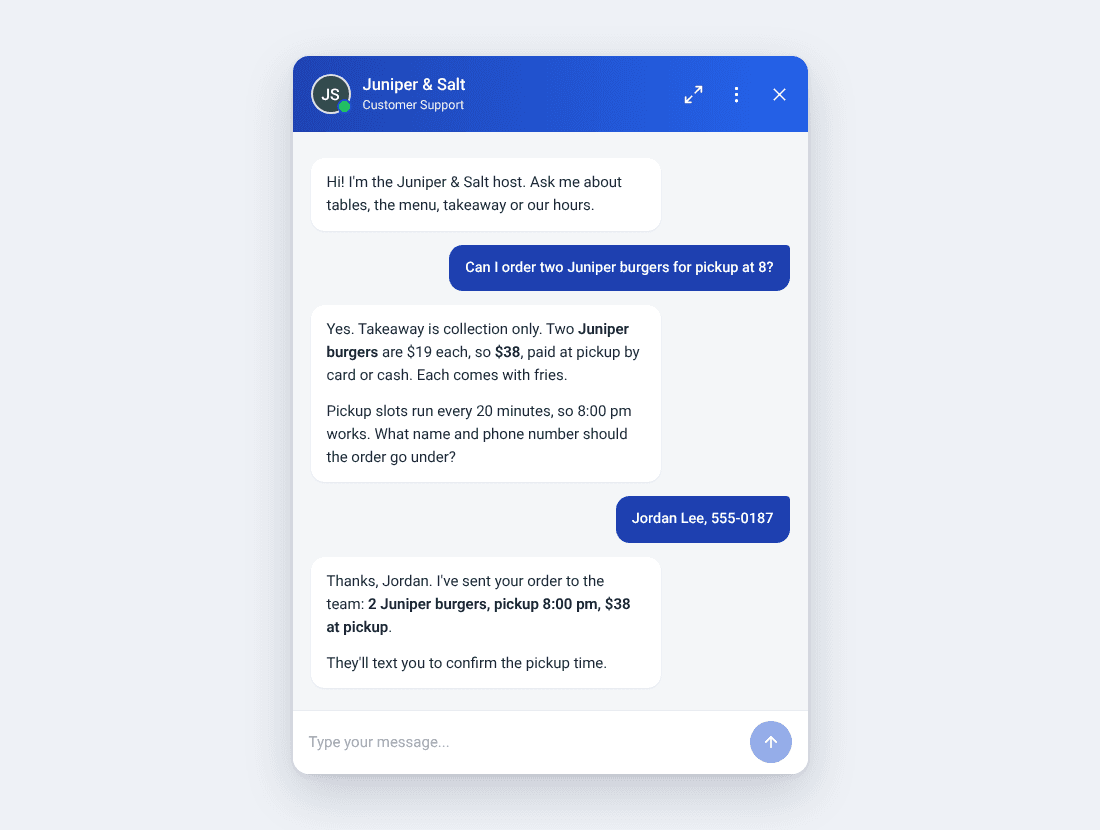
A restaurant ordering chatbot connected to your ordering software can send a ticket straight into it. Most small restaurants don't have that connection, so the order goes to the team by email and payment happens at pickup.
Sample data.
The bot quoted $19 per burger, totaled $38, checked the order against 20-minute pickup slots, and said payment happens at the counter.
That's a complete order with nothing invented. The only thing missing is a direct line into your system, and plenty of independent restaurants never need one.
Can a Restaurant Chatbot Answer Allergen Questions?
This is where a restaurant chatbot either earns trust or becomes a liability.
Here's the rule we recommend.
| The bot may | The bot hands to a person |
|---|---|
| Read back the allergens listed for a dish | Anything about severe allergies |
| Point guests to dishes that don't list an allergen | Cross-contact, shared fryers, prep surfaces |
| Remind guests to tell their server | "Is it safe for me?" |
| Tonight's special or anything not on the allergen table |
Why the line sits there: your allergen table describes recipes. It can't see the fryer, the cutting board or a supplier who swapped an ingredient this morning.
In the US, the FDA lists nine major food allergens: milk, eggs, fish, crustacean shellfish, tree nuts, peanuts, wheat, soybeans and sesame. Sesame was added on January 1, 2023.
In the UK, Food Standards Agency guidance covers 14 regulated allergens. Restaurants must provide allergen information for food that isn't prepacked, and the FSA describes written information backed by a conversation as best practice.
That pairing suits a chatbot. It provides the written part, and the handoff starts the conversation.
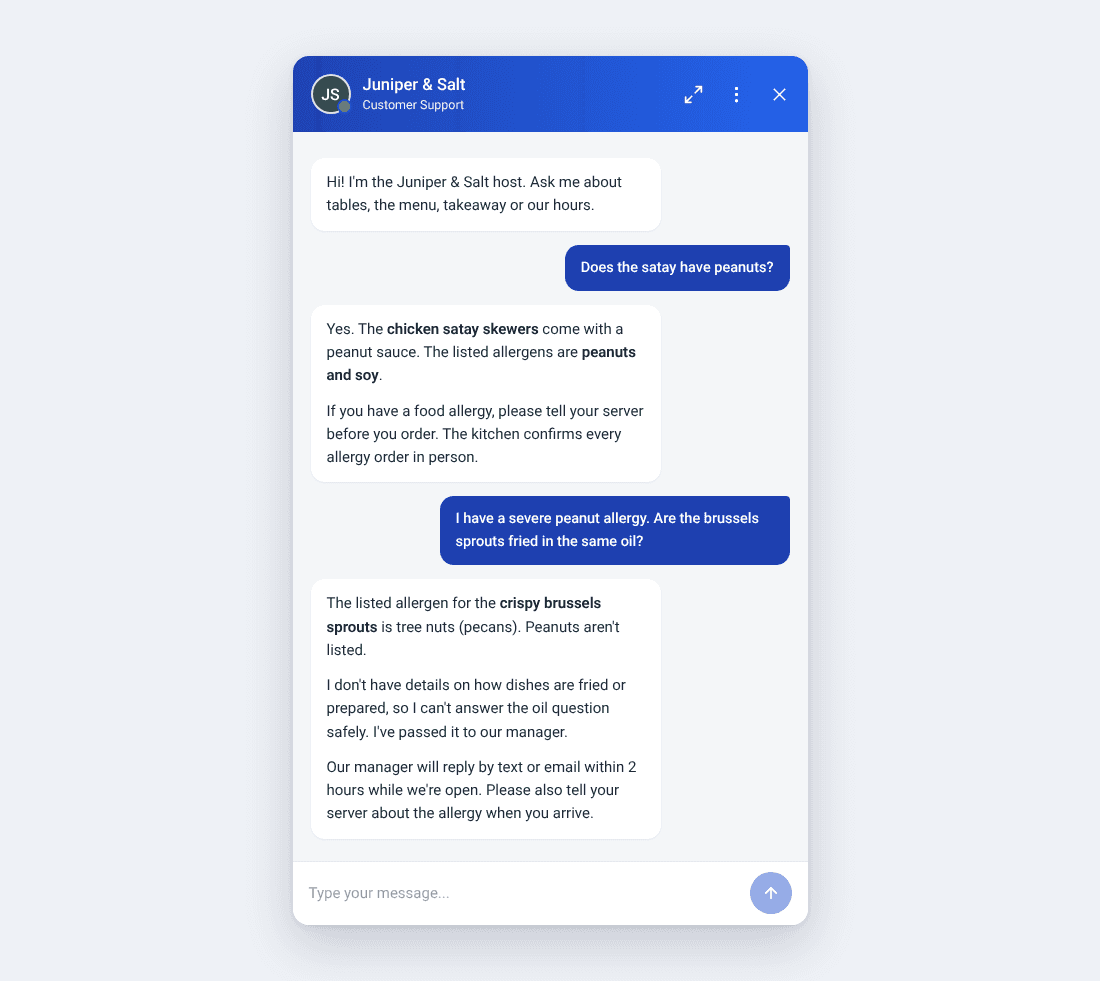
Sample data.
The first answer quotes the table. The second admits what the bot doesn't know, and passes the question to someone who can answer it.
Add your menu and allergen table, then test it on the questions your host gets every night. Start free.
Worked Examples: A Week at a 60-Seat Restaurant
Every number here comes from one sample restaurant, Juniper & Salt: 60 seats, open Tuesday to Sunday, with takeaway and a back room for private dining. The figures were calculated, and assumptions are labeled.
Example 1: A Normal Week
| Message topic | Conversations |
|---|---|
| Hours, location, parking | 38 |
| Table requests | 34 |
| Menu and dietary | 31 |
| Takeaway orders | 19 |
| Allergens | 9 |
| Private dining | 6 |
| Complaints and other | 5 |
| Total | 142 |
Those 142 conversations produced 389 bot messages, about 2.7 per conversation. Friday and Saturday alone carried 42% of them.
The bot resolved 82%, which is 116 conversations. It handed off 9%, about 13. The other 13 ended without an answer or a handoff, and those are the threads to review first.
Assumption: each resolved conversation saves 2 minutes of staff time. That's 232 minutes, or about 3.9 hours a week, roughly 16.8 hours a month.
So what? That's two full evening shifts a month that nobody spends typing opening hours.
Example 2: What It Costs at That Volume
389 messages a week works out to about 1,686 a month.
| Plan (billed annually) | Messages a month | Fits? |
|---|---|---|
| Free | 50 | No |
| Starter, $15.17/mo | 500 | No. Lasts about 9 days |
| Standard, $79.17/mo | 4,000 | Yes, with room to spare |
On Standard, that's about $0.047 per message, or roughly $0.16 per resolved conversation.
For context on how other tools price, see how much an AI chatbot costs.
Example 3: December, and the Night It Goes Wrong
Assumption: holiday bookings push messages up 60%, to about 2,697 a month. That's still 1,303 under the Standard cap.
Then three things go wrong in one week.
The PDF menu still shows last month's price. The bot quotes it correctly from the file, but the file is wrong. Fix: replace the menu file the day prices change.
Holiday hours weren't added. The bot says you're open on Christmas Day. Fix: add holiday hours before the week starts. In our sample knowledge base, the hours item was updated three hours before the screenshot.
A guest asks about tonight's special. It isn't in the content, so the bot declines and hands off. That's the system working, not failing.
How to Set Up a Restaurant Chatbot
1- Feed It What Guests Actually Ask
A chatbot is only as good as the content behind it.
| Content | Update when |
|---|---|
| Dinner menu with prices | Every price or dish change |
| Allergen table by dish | Every recipe or supplier change |
| Opening hours and last seating | Seasonally |
| Holiday hours | Before each holiday |
| Booking policy, deposits, hold times | When the policy changes |
| Private dining details | When capacity or pricing changes |
| Takeaway hours, pickup slots, payment | When the kitchen changes them |
| Parking, accessibility, kids, corkage | Twice a year |
| Gift cards and events | Each campaign |
| Tonight's special | Leave it out on purpose and let the bot hand it off |
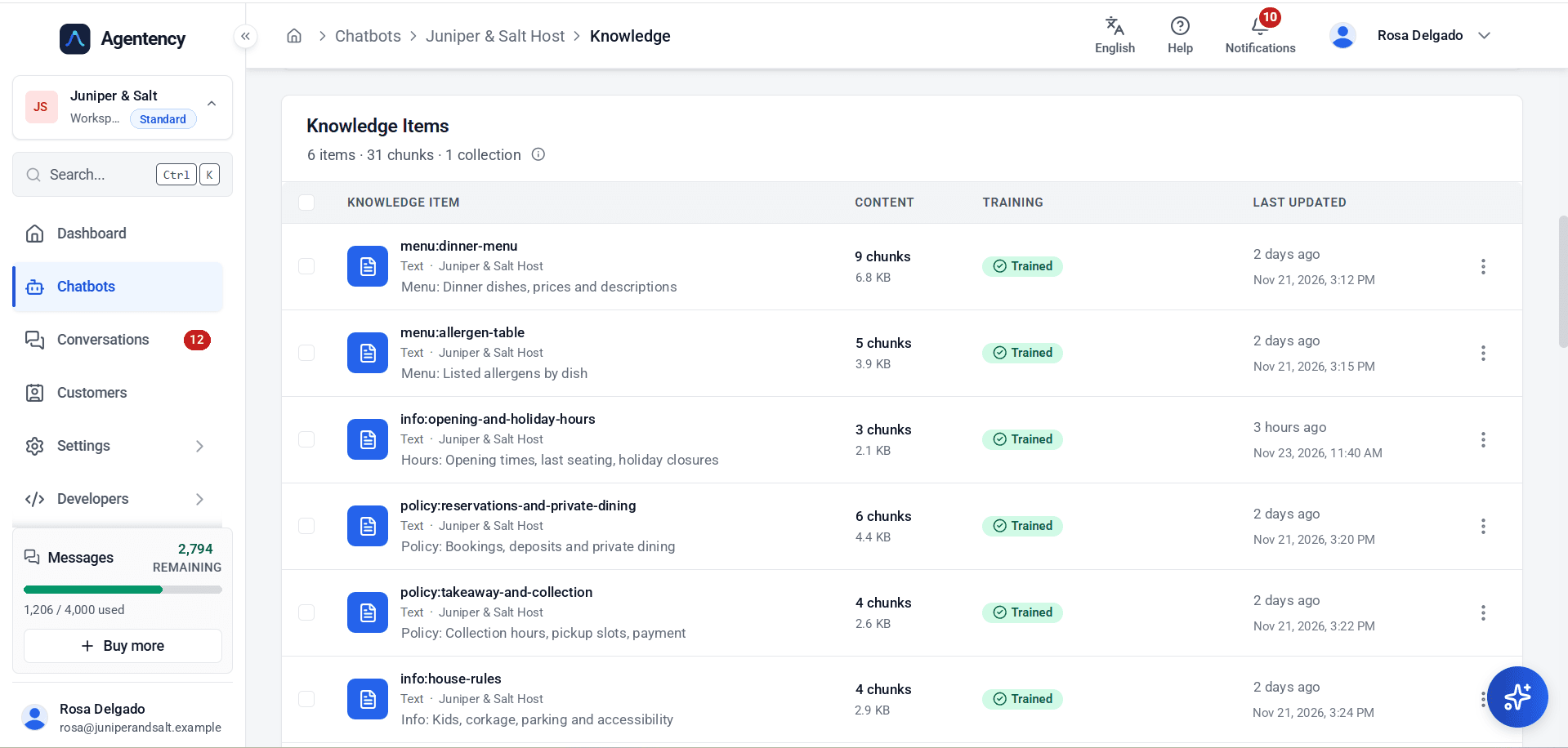
Sample data.
Tip: give every item a clear name like "menu:allergen-table". When you check an answer later, you'll see at a glance which item it came from.
2- Write the Rules It Must Follow
Keep each instruction short and absolute. "Never say a dish is allergen-free." "Always say a table request isn't confirmed until the team replies."
Tip: write rules for the answers you'd be embarrassed by, not the ones you're proud of.
3- Add the Actions
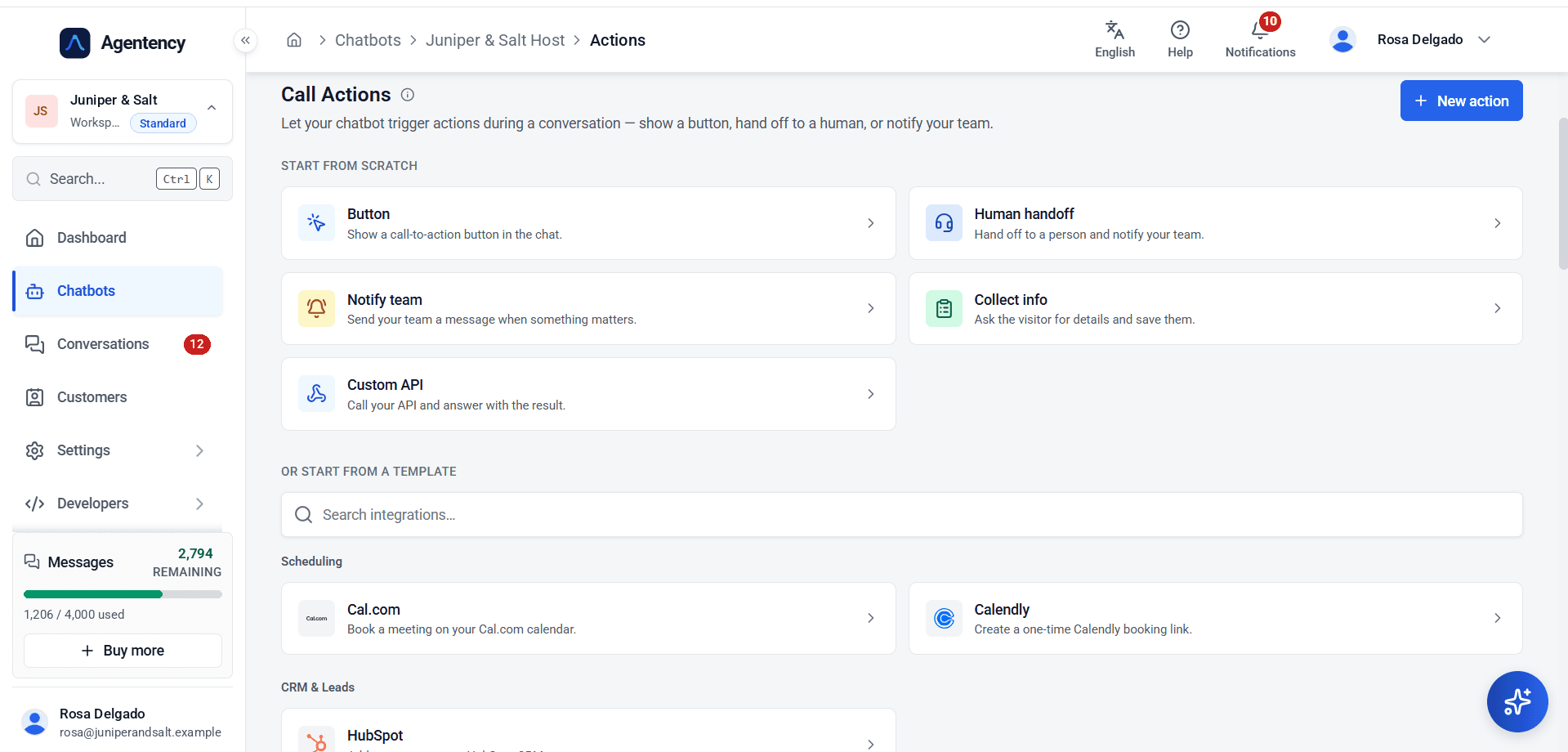
A handoff rule, a way to collect guest details, and a team alert for bookings and orders.
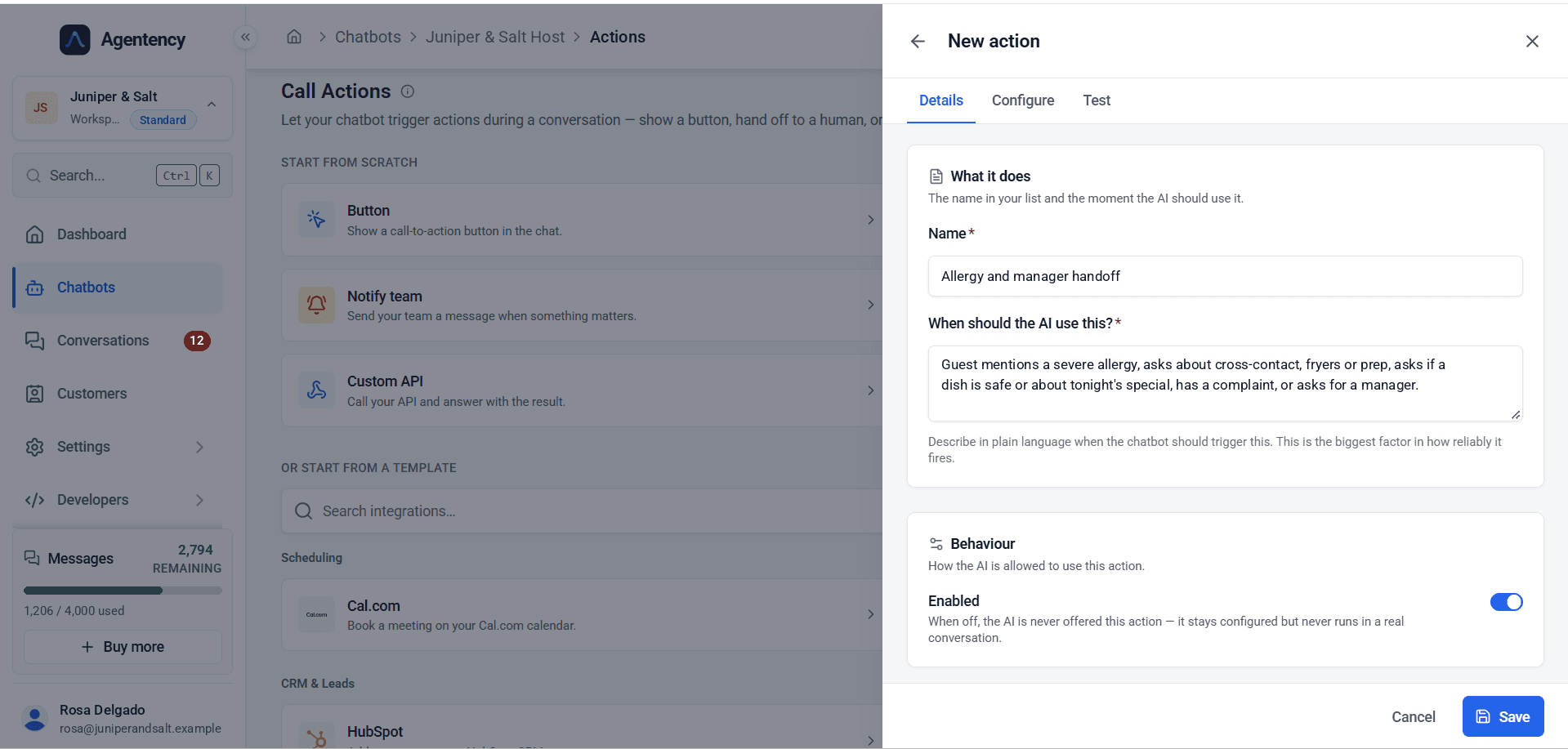
Sample data.
The trigger text decides how reliably the handoff fires, so name the situations plainly.
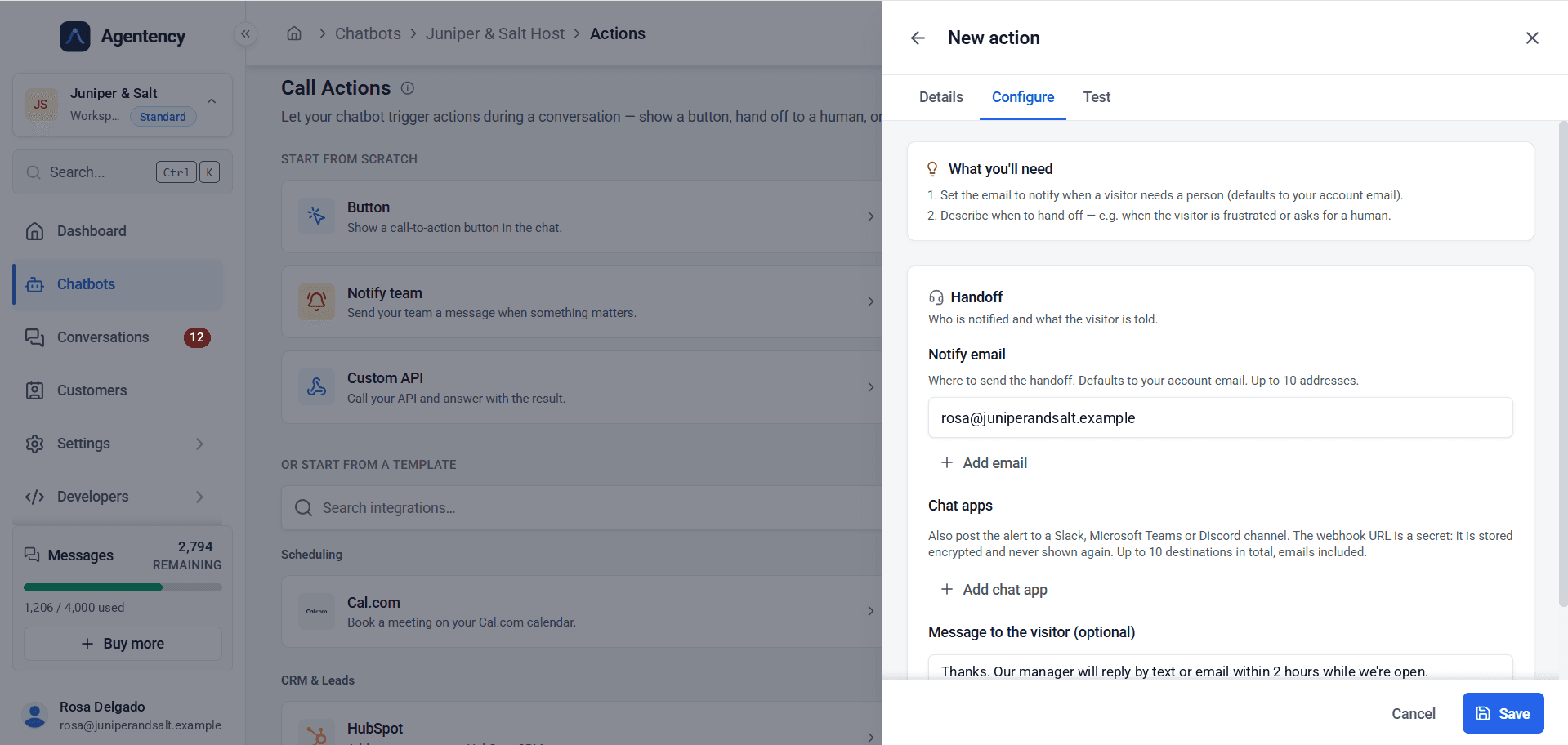
Sample data.
Tip: the message to the visitor should promise a time frame you can actually keep.
4- Test It on Real Guest Questions
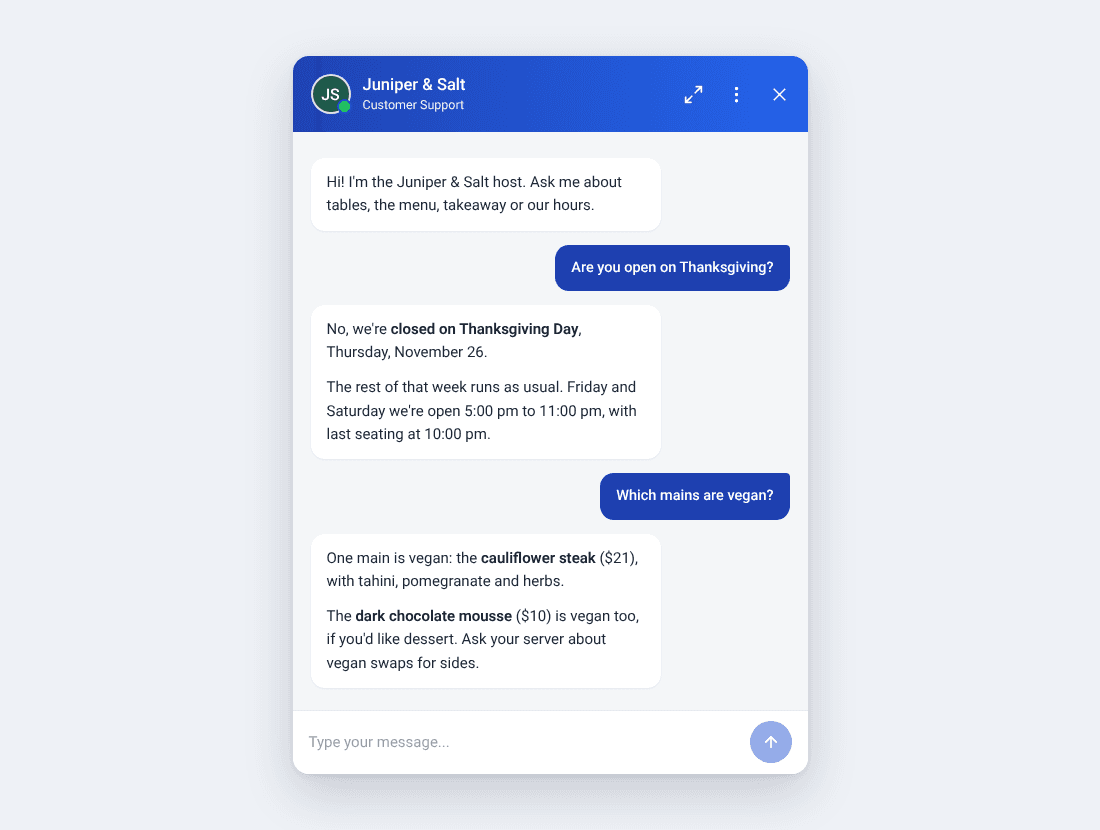
Ask what your host gets asked. "Are you open on Thanksgiving?" "Which mains are vegan?"
Sample data.
Tip: when an answer is wrong, fix the document, not the wording of the question.
5- Go Live on Your Website and WhatsApp
Start with a chatbot for your restaurant website, then add WhatsApp, where regulars already message you.
A restaurant WhatsApp chatbot has one rule worth knowing. Under the WhatsApp Business Messaging Policy, you can reply freely for 24 hours after a guest's last message. After that, only approved message templates are allowed. The policy also requires a clear way to reach a person when automation answers.
So what? A follow-up sent the next day ("your table is confirmed") needs a template, or has to come from your team directly.
6- Review Week One
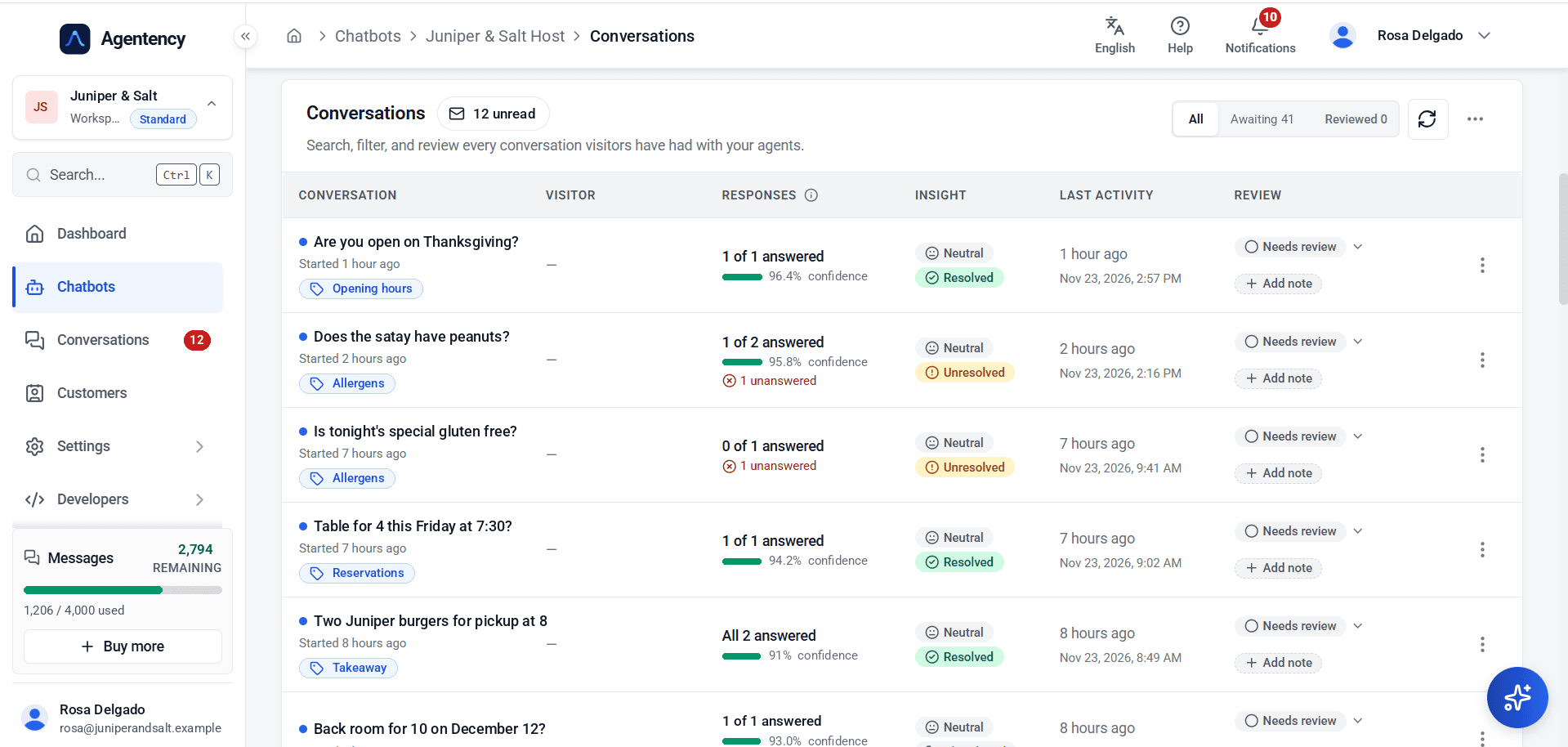
Check what share of conversations the bot resolved, how often it handed off, and which questions went unanswered.
Sample data.
Sample data.
Tip: every unresolved thread is either a missing document or a correct handoff. Sort them into those two piles first.
For a wider view of what to look for in any assistant, see this guide to AI chatbot features.
Restaurant Chatbot vs Phone AI vs Booking Widget
| Restaurant chatbot | Phone AI | Online booking widget | |
|---|---|---|---|
| Where it works | Website, WhatsApp, social DMs | Phone calls | Your website or booking page |
| Answers open questions | Yes, from your content | Yes, by voice | No |
| Books tables | Requests, or bookings with a connection | Usually, through a connection | Yes, natively |
| Allergen questions | Reads the table, hands off the rest | Varies | No |
| Best when | Guests message you | Guests mostly call | Guests only want a slot |
If your guests mostly call, a chatbot alone won't fix your phone. If they message, a booking widget alone won't answer them.
What a Restaurant Chatbot Costs
Costs follow message volume, not seats. Agentency's plans, billed annually:
| Plan | Price | Messages a month | Good for |
|---|---|---|---|
| Free | $0 | 50 | Testing on your own menu, with the website widget only |
| Starter | $15.17/mo | 500 | Small cafés, includes WhatsApp |
| Standard | $79.17/mo | 4,000 | A busy 60-seat restaurant |
| Pro | $199.17/mo | 15,000 | Groups with several locations |
Extra messages cost $20 per 1,000 and never expire. Meta also bills some WhatsApp message types on its side, so check your channel setup before a big campaign.
Common Mistakes
Letting it guess allergens. A guessed answer is a safety risk. Fix: keep prep and cross-contact out of the content, and hand them off.
Feeding it a stale PDF. The bot repeats your file faithfully, mistakes included. Fix: put menu updates on the same checklist as price changes.
Calling a request a booking. Guests show up for tables that don't exist. Fix: say "request" until the team confirms.
Nobody owns the handoff email. Escalations sit unread on a Saturday. Fix: send them to the manager on shift, not a general inbox.
Ignoring channel rules. Next-day WhatsApp follow-ups fail outside the 24-hour window. Fix: use templates, or reply in person.
How Agentency Handles Restaurant Conversations
What does it take for a chatbot to say "I don't know" at the right moment?
Answers Only From Your Content
Agentency answers from the menu, policies and pages you add. When nothing relevant is found, a quality check blocks the reply and the bot says it doesn't know, rather than guessing. You always see which content supported each answer. Guests see source links only if you turn that setting on.
Hands Off With the Full Conversation
A handoff flags the conversation and emails your team the reason, the guest's last message and a link to the transcript. Your team replies by email, phone or the guest's own channel. There's no live chat inbox to staff.
Collects Bookings and Orders
Collect info saves the guest's details to your customer list, and Notify team emails your staff when a booking, order or event enquiry comes in. This is the level 2 setup from the table above, and it needs no integration project.
Connects to Your Booking System Through an API
There's no ready-made template for restaurant booking platforms. If your booking or ordering software has an API, a Custom API action can check a slot or create a booking, and the guest confirms before anything is created. Ready-made templates cover Cal.com, Calendly, Shopify draft orders and WooCommerce orders.
Sample data.
Shows You What Guests Ask
The dashboard tracks conversations, resolution rate and handoff rate over 7, 30 or 90 days. The same knowledge answers on your site and up to 10 messaging channels, in the guest's language.
See how this looks for restaurants specifically on the Agentency restaurants page, or compare approaches in this roundup of conversational AI platforms.
Who Needs a Restaurant Chatbot
The Neighborhood Restaurant
Forty covers a night, one host, the same questions every evening. Level 1 and 2 cover almost everything.
The Takeaway-Heavy Kitchen
Orders come by message. Collecting them cleanly, with pickup slots and totals, saves phone time during the rush.
The Restaurant With a Private Room
Event enquiries are your highest-value messages. A bot that collects headcount, budget and occasion turns a vague question into an enquiry your events lead can quote.
The Small Group With Two or Three Locations
Each location needs its own hours and menu, but the same rules. Shared policies with separate content keep answers right per site.
Back to Friday, 7:40 pm
Three messages arrive while your host seats a party of six.
This time, all three get answered. The table request is logged, with a clear note that the team will confirm. The satay question gets the listed allergens. Thanksgiving gets an honest "closed".
And if the next guest asks about the fryer, a manager hears about it straight away.
Give your restaurant chatbot your menu tonight and see what it answers by Friday. Start free.
Frequently asked questions
Written by