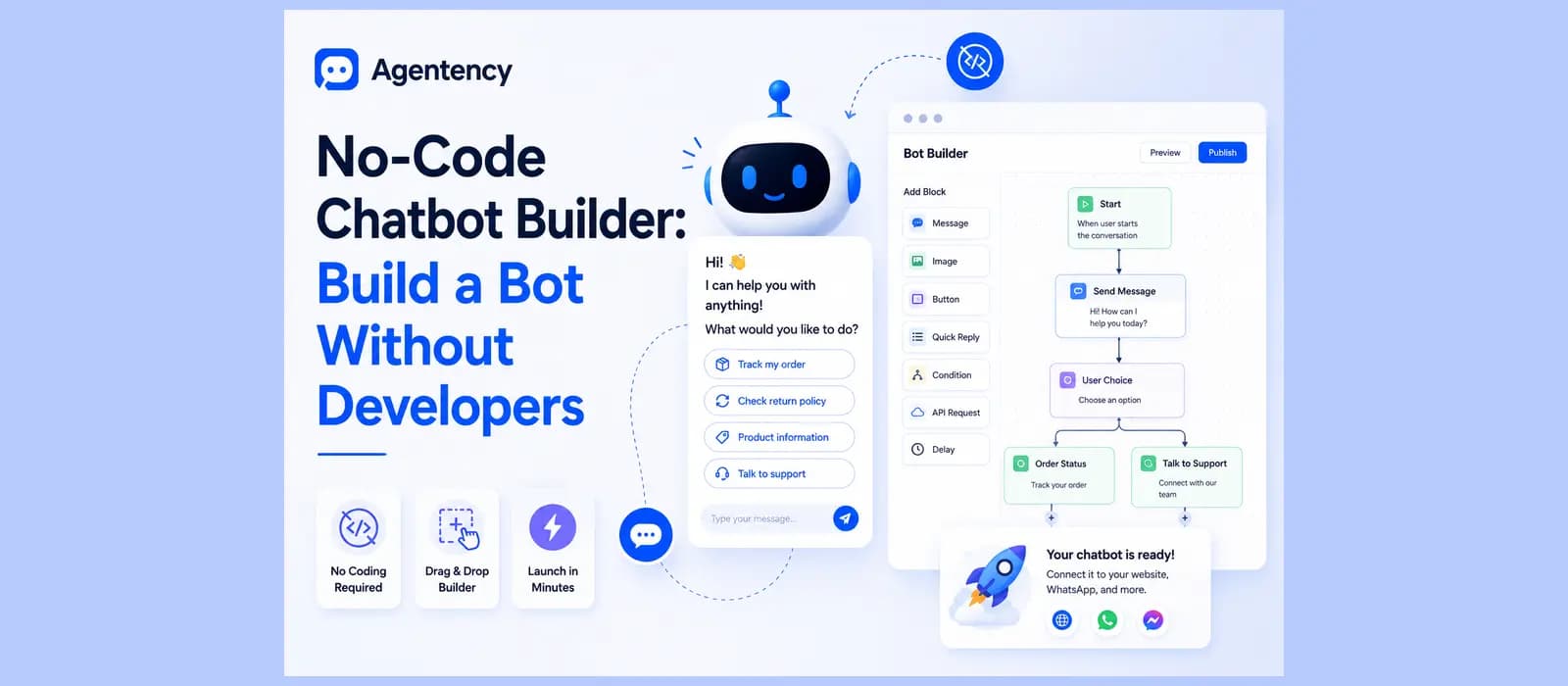
No-Code Chatbot Builder: Build a Bot Without Developers
Your support team has a good idea for a chatbot. Maybe it answers the same five questions that eat up half of every Monday. The idea is solid. The problem is the dev team is booked for the next quarter, and by the time anyone gets to it, the idea is stale.
That gap is exactly where a no code chatbot builder earns its keep. Search interest in this exact phrase has grown roughly tenfold in two years, from about fifty searches a month to well over five hundred, and it's still climbing. People aren't just curious about this anymore. They're actively trying to solve the problem right now, without waiting in line behind engineering.
We build one of these at Agentency, so I'm not writing this as a neutral bystander. But I'll tell you exactly what to look for, what the honest tradeoffs are, and where the category as a whole runs out of road, not just where our tool happens to win.
What a No Code Chatbot Builder Actually Is
A no code chatbot builder is a platform that lets someone without a developer background create, configure, and launch a chatbot. No JavaScript, no APIs to wire up by hand, no waiting on IT. You do the whole thing through a visual interface or a guided setup flow.
People search for this under a handful of different names, a no code bot builder, a no code ai chatbot builder, sometimes just how to make a bot without knowing any of this terminology yet. It's all the same underlying question, and none of the phrasing changes the answer.
That definition covers a lot of very different products, and that's exactly the problem. Some tools in this category are drag and drop canvases where you design every branch of the conversation yourself. Others train directly from your existing content and skip the conversation design step almost entirely. Both are honestly no code. They are not the same amount of actual work.
The category splits into a few honest camps once you actually look at it. Voiceflow and Botpress lean toward teams comfortable with some technical depth, closer to low code than the fully non technical end. ManyChat and Chatfuel grew up around Facebook Messenger and Instagram automation and are still strongest there. HubSpot's chatbot builder lives inside a CRM and is mostly built for lead capture flows tied to contact records. None of that makes any of them bad. It just means the honest answer to which chatbot builder is best depends entirely on what you're actually trying to do.
Flow Builder or True No Code, the Real Difference
Here's a distinction that most comparison articles either miss entirely or use to sell you something.
Most bot builders in this style share the same basic DNA. A flow builder gives you a canvas, message blocks, decision branches, and a library of action blocks to snap together. WotNot advertises forty plus action blocks. Landbot lets you build a workflow from scratch or from a template and connect it to your existing stack through integrations. These are genuinely no code in the sense that you're never touching a line of code, but you are still doing real design work. You're mapping out every path a conversation could take, deciding what happens if someone types something unexpected, and testing each branch by hand.
Agentency works differently on purpose. There's no flow canvas to draw. You point it at your website or upload what you already have, your FAQ page, your policies, your product pages, and it builds its own knowledge base from that content automatically. You're not designing conversation paths. You're handing over what you already know and letting the retrieval engine do the matching.
Neither approach is better in some universal sense. If you want fine grained control over an exact script for an exact scenario, a flow builder gives you that. If you want something that can actually answer the messy, unpredictable version of a question a real customer types, and you'd rather not draw forty decision branches to get there, a builder that trains from your content directly gets you there faster. We've written more on where the line between a scripted chatbot and a real AI agent actually sits, worth a read if the terminology itself is part of what's confusing you.
See how a no code chatbot builder that trains from your own content actually works. Start free.
What to Actually Look For Before You Pick One
Every best no code ai chatbot builder 2026 roundup gives you a features checklist. Here's the version that actually matters once you're past the demo.
AI Quality, Not Just a Pretty Flow Canvas
A clean drag and drop interface tells you nothing about whether the bot can actually understand a misspelled question or a follow up that only makes sense if it remembers what was asked two messages ago. Ask any no code ai chatbot builder you're evaluating a real question, phrased the messy way a customer would type it, and watch what happens when it doesn't know the answer. A good one says so plainly. A bad one guesses with total confidence. This one test, run before you sign up for anything, tells you more than the entire features page. Most vendors let you try this during a free trial specifically because they're confident enough in the answer. Take them up on it before you commit any real content to training it.
Channels, Especially WhatsApp
Most tools in this category cover two or three channels well, usually website chat and Facebook Messenger, and treat everything else as an afterthought. Chatbots on websites are still the most common starting point for most businesses, but they shouldn't be the only channel you plan around. That's a real gap if a meaningful share of your customers message you on WhatsApp instead of visiting your website, which is the default in a lot of markets outside the US. A genuine no code whatsapp chatbot builder should mean the same bot, the same knowledge, and the same quality of answer on WhatsApp as on your website widget, not a stripped down version bolted on afterward. This is one of the first things worth testing directly. Ask the same question on the website widget and then on WhatsApp. If the WhatsApp answer is shorter, dumber, or missing entirely, you've found the seam where the vendor's real product ends and the afterthought begins.
No Code Chatbot Builder for Customer Engagement, Not Just Deflection
Most people evaluating this category think purely in terms of deflecting support tickets. That's a real use case, but a no-code chatbot builder for customer engagement does more than answer and disappear. It can nudge someone who's been sitting on a pricing page for three minutes, follow up after a purchase to ask if everything arrived fine, or surface a relevant answer before the customer even finishes typing the question. Deflection saves you time. Engagement actually moves people toward a decision.
Free or Paid, and What That Actually Means
A no code chatbot builder free plan is worth checking closely before you assume it covers what you need. Some free tiers are genuinely capped at a small number of conversations a month, enough to test the product honestly. Others are free chatbot builder no code demos that quietly push you toward a paid tier the moment you try to do anything real, like connecting a second channel or training on more than a handful of pages. Read the actual limits, not just the word free on the pricing page.
Human Handoff That Doesn't Waste Everyone's Time
Every chatbot hits a question it can't answer. What happens next is the part most comparisons skip. A weak handoff dumps the customer into a live chat queue where they have to explain the whole problem again from scratch. A good one passes the full conversation along with the handoff, so the human on the other end already knows what's been asked and what's already been tried. We wrote a full breakdown on designing handoff that doesn't destroy trust, since getting this one part wrong undoes most of the goodwill the bot built up in the rest of the conversation.
No Code Builder or a Custom Build, Which One You Actually Need
Before you pick a builder at all, it's worth asking whether you need one, or whether you're actually looking for custom chatbot development instead.
A chatbot development service for websites, an agency or a freelance developer building something bespoke from scratch, makes sense when your requirements are genuinely unusual, a multi step approval workflow tied to internal systems nobody else has, for example. For almost everyone else, that route means a multi month timeline and a bill with several zeros on it, for a result a builder like this gets you to in an afternoon. I've watched businesses spend three months and a real budget on custom chatbot development for a use case that turned out to be answering shipping questions and checking order status, exactly the kind of thing this category of tool handles out of the box. Save the custom build for the part that's actually custom.
Agentency as a No-Code Chatbot Builder
Everything above has been general advice for evaluating any no code chatbot builder. Here's specifically what we built, since this is the part I can actually speak to firsthand rather than guess at from a features page.
Built for Arabic Speaking Customers, Not Translated Into Them
This is the feature almost nobody else in this category writes about, and it matters more than most feature checklists.
An arabic no-code chatbot builder in name only usually just runs the reply text through translation. The chat window itself, the input field, the message bubbles, the timestamps, all of it stays left to right, with translated Arabic text sitting awkwardly inside a layout built for English. Anyone used to reading right to left notices immediately, even when every word is technically correct.
Agentency was built right to left native from the start rather than adding Arabic on as an afterthought, because a meaningful share of the merchants we work with serve Arabic speaking customers every single day. The whole widget flips, not just the words inside it, and the agent replies automatically in whatever language the customer actually writes in, across more than ninety languages total. This isn't a checkbox feature we added because a spec sheet demanded it. It came from watching merchants get half a solution from tools that treated Arabic as an export destination for English content rather than a language their own customers actually think and write in.
Multiple Agents for Multiple Clients
If you're setting this up for more than one client or more than one brand, a single account with one login and one knowledge base becomes a mess fast.
Agentency lets you run multiple agents from one account, each with its own knowledge base, branding, and settings, and team workspaces come with roles and permissions so a client's marketing person doesn't accidentally see another client's conversations. This is the specific thing that a no code ai chatbot builder for agencies actually needs and most general purpose tools weren't built with in mind, since most of them assume one company, one bot, one team.
Managing chatbots for more than one client? See how Agentency's workspaces keep them separate. Start free.
How to Build Your Own Chatbot on Agentency
This is the part that actually matters most when you're evaluating a builder, not a features list but what the process really feels like. Here's what it looks like end to end, not a generic seven step template you'll find on every other page about this topic.
Pick a Template
Start from one of ten ready made templates, Customer Support, Sales Assistant, Technical Support, HR Assistant, Educational Assistant, Healthcare Assistant, Financial Advisor, Legal Assistant, Media and Content Assistant, or a General AI Assistant if nothing else fits. Every template is already localized in English, Arabic, and Spanish, so you're not starting from a blank page even if you serve a bilingual audience. You can also skip templates entirely and start from scratch.
Set the Basics
Name the agent, upload an avatar, and pick a header style from a curated color palette. Write a welcome message and a fallback message for when it genuinely doesn't know something. Pick the primary language and the chat font. None of this requires touching a stylesheet.
Choose the Model and Write the Persona
Pick which AI model powers the agent's answers, Qwen, DeepSeek, Google Gemma, GPT OSS, GLM, or Anthropic Claude are the current options, and the platform automatically applies an accuracy tuned configuration for whichever one you choose. There's a creativity slider and an answer length setting if you want to adjust the tone. Then write the persona and instructions in plain language, what the agent should sound like, what it should never do, any rules specific to your business. No code, just a text box you fill in like you're briefing a new employee.
Turn On Lead Capture If You Need It
If you want visitors to share their name and contact details before chatting, there's a toggle for that. Off by default, on if your use case is sales or lead qualification rather than pure support.
Deploy It Everywhere Your Customers Already Are
Once the agent is trained and configured, deploy it to a website widget, a shareable hosted chat page if you don't even want to touch your site's code, or any of the messaging channels your customers actually use, WhatsApp, Instagram, Telegram, and more, all from that same one agent. No separate rebuild per channel.
Launch and Watch the First Week
Review everything and launch. The first week matters more than the setup did. The needs attention panel in your dashboard shows exactly which questions the agent couldn't answer, so you add the missing content and it gets better without anyone touching a flow diagram or rebuilding anything.
When No Code Isn't Enough Anymore
Every builder in this category, including ours, has a ceiling, and I'd rather tell you where it is than pretend it doesn't exist.
If you need genuinely bespoke logic, something that branches on twelve different business rules unique to your operation, or a deep, custom integration into a system nobody else has ever connected to, a no code chatbot builder isn't the right tool for that specific piece, no matter which one you pick. That's when you bring in a developer for the custom part and let the no code layer handle everything else. Most businesses never actually hit this ceiling. But it exists, and any article that tells you otherwise is selling you something. A furniture retailer needing a bot that calculates custom delivery windows across eleven regional warehouses with different cutoff times is a real, specific case where a developer earns their fee. A retailer that just wants accurate answers about sizing, shipping, and returns almost never needs to go there at all.
If what you actually want is the fuller walkthrough on evaluating an AI agent before you commit to one, we put together a forty question checklist covering pricing, channels, guardrails, and how to actually measure resolution rate, worth running against any vendor, including us, before you sign anything. And if you want the more general, platform agnostic version of how to create an AI chatbot step by step, we covered that in more depth separately.
Measuring Whether It's Actually Working
Building the bot is not the finish line. A containment rate that looks great on day one can quietly collapse by week three if nobody's watching it.
Three numbers matter more than the rest. Containment rate, how many conversations get resolved without a human stepping in. Where conversations actually drop off, which tells you exactly which part of your knowledge base is thin. And plain customer sentiment, thumbs up or thumbs down is honestly enough, rather than an elaborate survey nobody fills out. If your builder can't show you these three things in a dashboard you can actually read, that's worth knowing before you commit a knowledge base's worth of content to it.
Frequently asked questions
What is a no code chatbot builder?
A platform that lets someone without developer skills create and launch a chatbot through a visual interface or a guided setup flow, instead of writing code or waiting on an engineering team.
Is Botpress a no code chatbot builder?
Botpress leans more toward developers than most tools in this category. It offers visual building blocks but is generally positioned for teams with at least some technical capacity, closer to low code than the fully non technical end of no code.
What is the best no code ai chatbot builder 2026?
There isn't a single universal answer. If you want fine grained control over exact conversation paths, a flow builder like Landbot fits that. If you want a bot that trains directly from your existing content with no flow diagram to draw, and you specifically need WhatsApp and Arabic support done properly, that's what we built Agentency for.
How do I make a bot without hiring a developer?
Pick one of these tools, connect it to what you already have, your website, your FAQ page, your documents, set the basics like tone and language, and launch it on the channels your customers actually use. The building your first bot section above walks through this exact process.